

Who is this for? Users with the Organisation Administrator role.
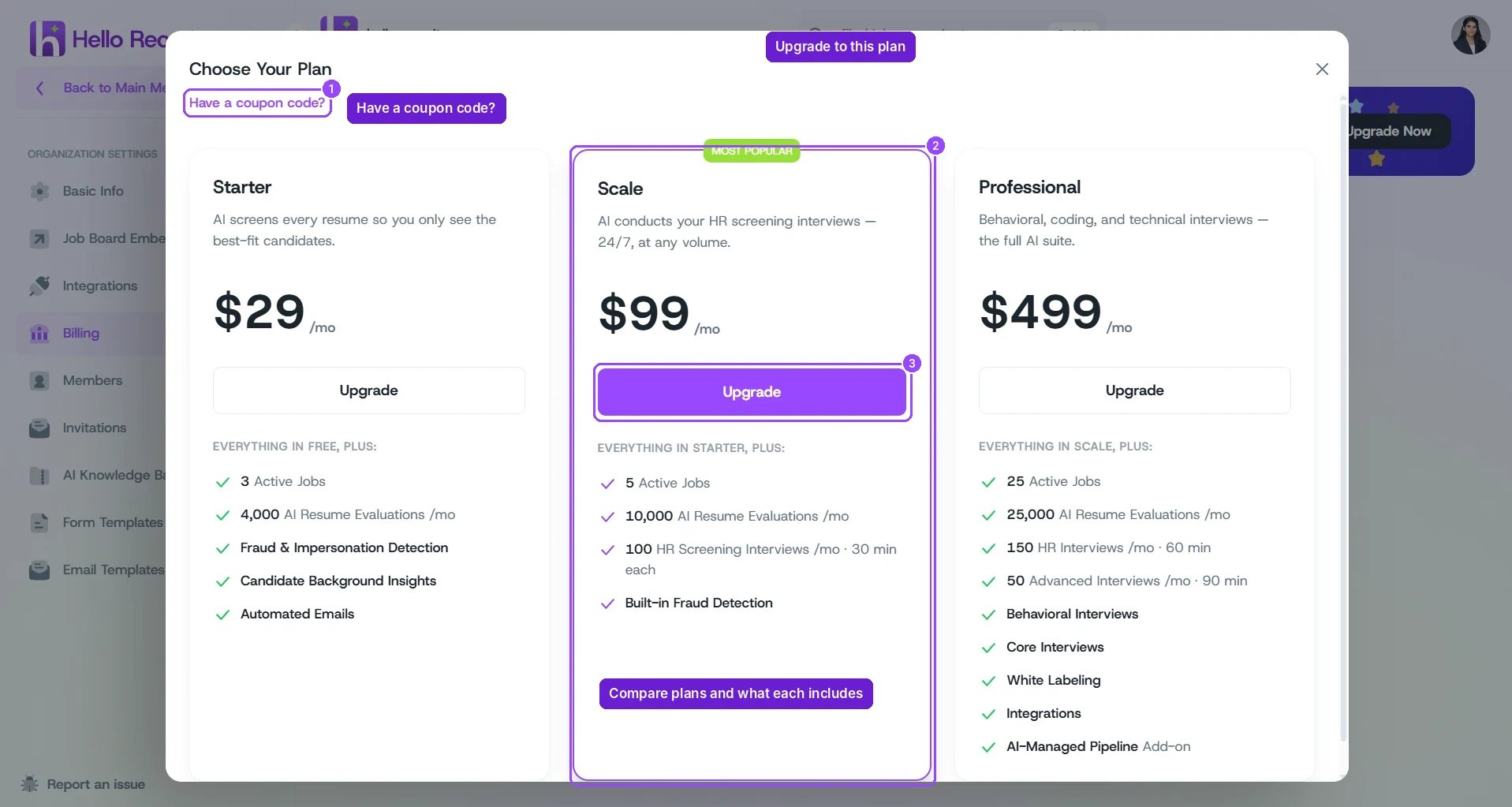
Choose Your Plan, opened from Organization Settings → Billing
Available Plans
Each plan includes everything in the plan before it.
The Free plan includes 1 active job and lets you explore the platform and run your hiring manually. It doesn’t include AI resume evaluations or AI interviews, and Hello Recruiter branding is shown to candidates.
Plans and prices can change. The Choose Your Plan dialog in the app always shows the current offer, and hellorecruiter.ai/pricing has public pricing.
Choosing the Right Plan
Upgrading Your Plan
1
Open Billing
Open the main menu and go to Organization Settings → Billing. The banner shows your current plan.
2
Open the plan picker
Click Upgrade Now to open Choose Your Plan.
3
Apply a coupon (optional)
If you have a coupon, click Have a coupon code? and enter it.
4
Choose a plan
Click Upgrade on the plan you want and follow the prompts to pay.
Managing Your Subscription
Once you’re on a paid plan, Organization Settings → Billing shows:FAQ
What's the difference between HR screening and advanced interviews?
What's the difference between HR screening and advanced interviews?
HR screening interviews are initial screening conversations. Advanced interviews (Professional plan) cover deeper rounds such as technical, coding, and behavioral interviews, and can run for up to 90 minutes.
What happens if I reach a plan limit?
What happens if I reach a plan limit?
You can upgrade, buy Add-on Credits with Buy More on the Billing page, or wait for your monthly allowance to reset. For active jobs, pause or close a job to free up a slot. Contact support@hellorecruiter.ai if you’re unsure how a limit applies to your account.
Is there an annual discount?
Is there an annual discount?
Contact our sales team at sales@hellorecruiter.ai for annual pricing and volume discounts.
Do you offer plans for large teams or custom requirements?
Do you offer plans for large teams or custom requirements?
Yes. For custom requirements such as SSO, dedicated support, or custom integrations, contact sales@hellorecruiter.ai.
How do I cancel?
How do I cancel?
Go to Organization Settings → Billing and click Cancel Plan at the bottom of the page. Cancelling takes effect at the end of your current billing period, and you keep access until then.
Can I go over my plan's monthly limits?
Can I go over my plan's monthly limits?
Yes. Buy Add-on Credits (for example Core Interviews or AI Screenings) from the Billing page with Buy More. Credits have an expiry date, shown under each credit type.