Who is this for? Users with the Organisation Administrator and Recruiter roles.
Enable Video Insights is a switch on every AI interview stage. When it’s on, the candidate’s camera is used for AI analysis during the interview.

Turn On Video Insights

1

Open the AI interview stage

Open the job, choose Workflow from the Job Navigation menu, and click the AI interview stage. Follow-up calls have the same switch.
2

Switch on Enable Video Insights

On the stage’s Overview tab, below Duration, turn on Enable Video Insights (“Camera access required for AI analysis”).
3

Save

Click Save Changes.
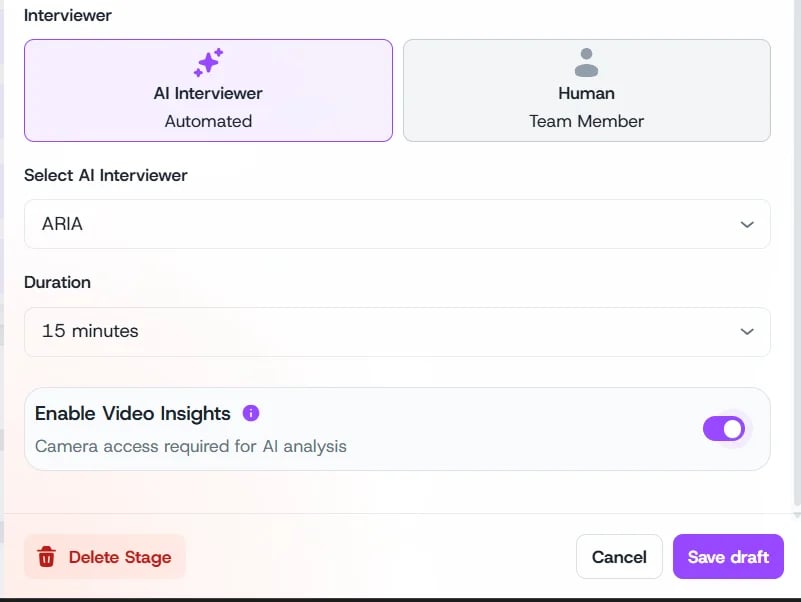
Stage settings with AI Interviewer ARIA, Duration 15 minutes, and the Enable Video Insights switch turned on

Enable Video Insights on an Aria stage

With Video Insights on, candidates need their camera for the interview. It isn’t available for phone interviews.

Where Results Appear

Video findings show up with the candidate’s other risk checks on the Risk Summary tab, for example Video Disengagement or “Candidate attended interview while in another meeting.” Review each one and mark it False Positive or keep it for review. See Risk Signals.

Risk Signals

AI Persona

Hiring Workflow