

Who is this for? Users with the Administrator role on Enterprise plans. Setup is coordinated with your account manager — no engineering work required on your side.
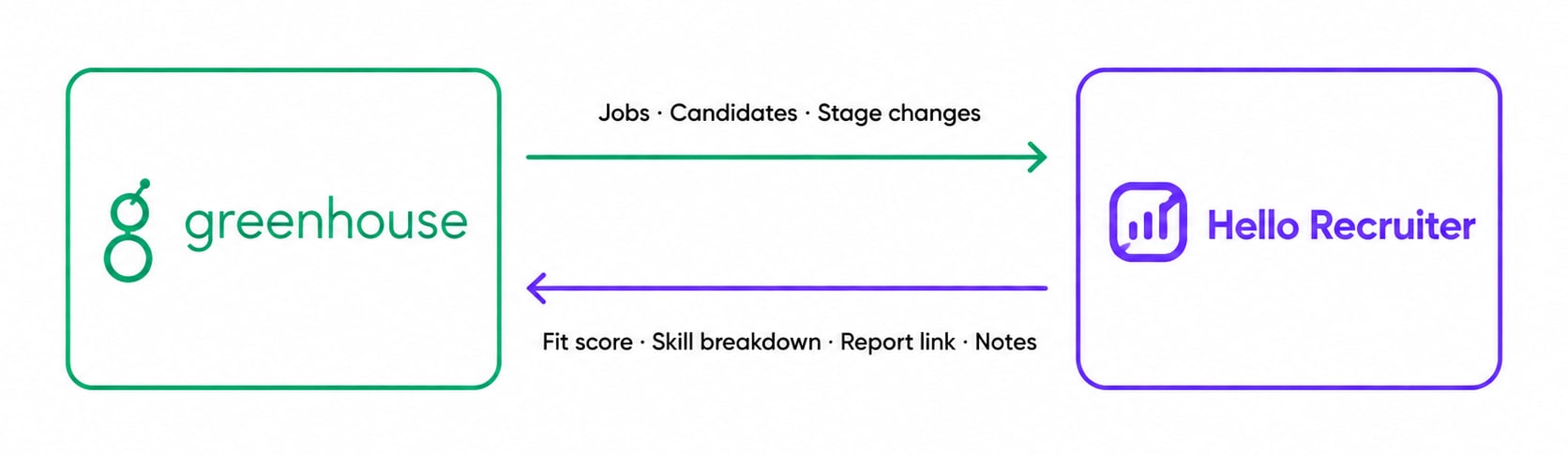
Jobs, candidates, and stage changes flow in from Greenhouse — scores, reports, and notes flow back
What You Get
- Automatic job import & AI interview setup — your open Greenhouse jobs sync into Hello Recruiter automatically. Job descriptions are parsed, and evaluation criteria and interview questions are generated for each role — seeded from your own Greenhouse interview kits and candidate attributes when available, so our AI asks the questions your team already configured.
- Real-time candidate sync — new applications, candidate updates, and stage changes flow in via webhooks the moment they happen, with an automatic reconciliation sweep as a safety net.
- Stage-triggered interviews — move a candidate to your chosen stage in Greenhouse and they receive an AI interview invite automatically. No exports, no copy-pasting emails.
- Greenhouse-native test sending — add Hello Recruiter as a stage from your stage library and send interviews with Greenhouse’s own Send test to candidate action. The status updates on its own once the candidate finishes.
- Results inside Greenhouse — the score, evaluation summary, per-skill breakdown, risk level, and hire recommendation render in the candidate’s interview kit, with a View Report link to the full Hello Recruiter report. A completed scorecard is filed on the candidate automatically, and a summary note is added to their activity feed.
- Interview plan mirroring (optional) — mirror your Greenhouse interview stages and keep candidate positions in sync as they move through your pipeline (one-way, Greenhouse → Hello Recruiter).
Connect Greenhouse to Hello Recruiter
1
Contact your account manager
Greenhouse integration is available on Enterprise plans. Reach out to your account manager or email support@hellorecruiter.ai to enable it for your Greenhouse account.
2
Authorize the connection
A Greenhouse Site Admin approves access for Hello Recruiter. Nearly all permissions are read-only — the only write permissions let us post interview summary notes and file completed scorecards on candidates.
3
Webhooks are provisioned automatically
The moment the connection is authorized, Hello Recruiter registers its webhook subscriptions through the Greenhouse API — covering new applications, stage changes, candidate updates, hire/reject decisions, and job changes — each verified with a signing secret. There’s nothing to configure in Dev Center.
4
Enable the assessment integration
We generate your Greenhouse Assessment API key and share it with you securely. Send it to your Greenhouse account manager (or Greenhouse support) and ask them to activate the Hello Recruiter assessment integration for your account.
The assessment API key is shown once and is unique to your organization — treat it like a password. If it’s ever exposed, contact support@hellorecruiter.ai and we’ll rotate it immediately.
Add the Hello Recruiter Stage to a Job
1
Open the job's interview plan
In Greenhouse, open the job and go to Job Setup → Interview Plan.
2
Add the stage from the library
Click Add stage, choose Add from library, tick Hello Recruiter, and click Add.
3
Position it in your plan
Drag the stage anywhere in the interview plan — most teams place it right after application review or the recruiter screen.
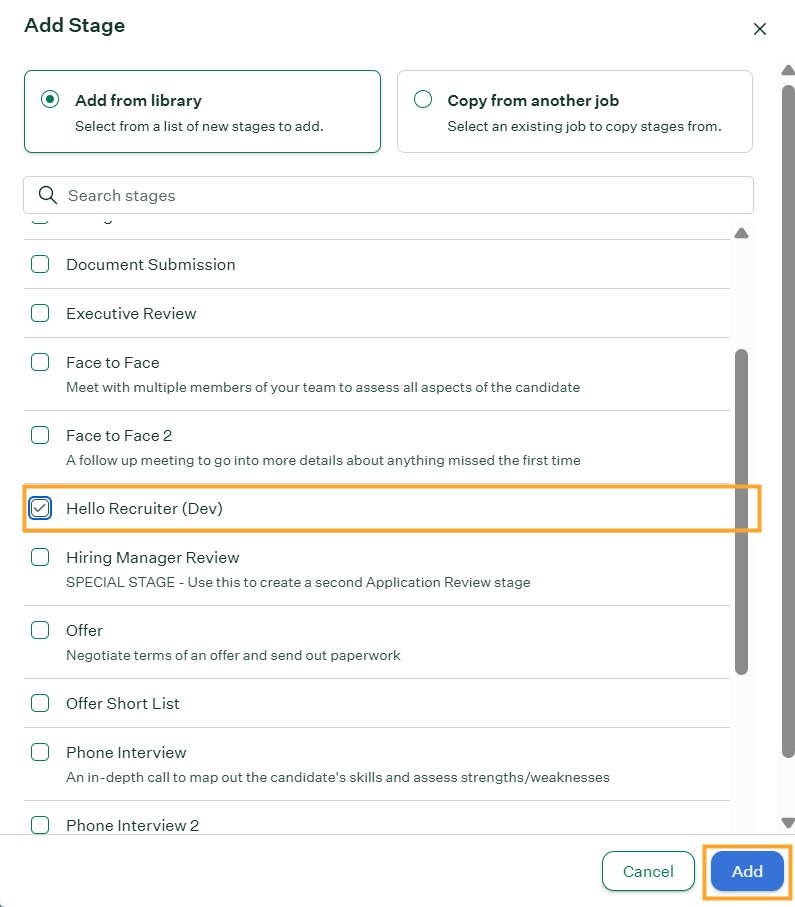
Add Stage — select Hello Recruiter from the stage library
Send a Test to a Candidate
1
Move the candidate to the Hello Recruiter stage
Advance the candidate to the Hello Recruiter stage in their pipeline — one at a time or in bulk.
2
Click Send test to candidate
On the candidate’s profile, the stage shows a Submitted tests panel reading “Test needs to be sent to candidate.” Click Send test to candidate.
3
The candidate interviews on their own schedule
The interview invite email is sent by Hello Recruiter (not Greenhouse), and the candidate completes a live AI interview whenever suits them. The test status on the candidate updates automatically when they finish.
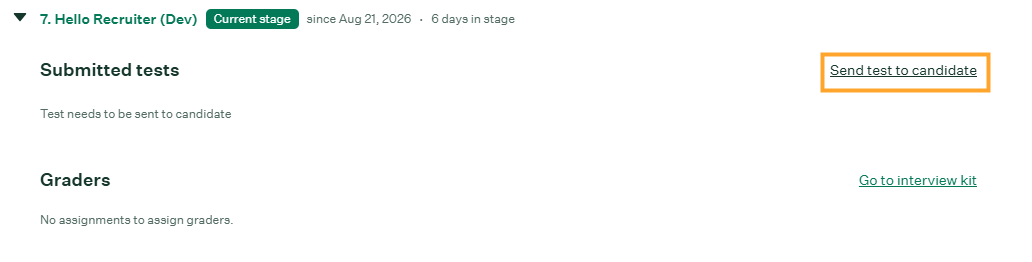
The Hello Recruiter stage on a candidate — send the test from Submitted tests
Review Results in the Interview Kit
When the interview completes, open the candidate and click Go to interview kit on the Hello Recruiter stage. The report renders directly in the kit:- Score — the overall fit score out of 100.
- Evaluation — a narrative summary of the candidate’s experience, strengths, and gaps.
- Risk Level and Risk Score — integrity signals from the interview session.
- Hire Recommendation — strong hire, hire, neutral, or no hire.
- Per-skill scores — each evaluated skill scored out of 10 with a sentence of evidence from the interview (for example, ”.NET and C# Development — 10/10”).
- View Report — one click to the full Hello Recruiter report with the transcript, recordings, and detailed scoring.
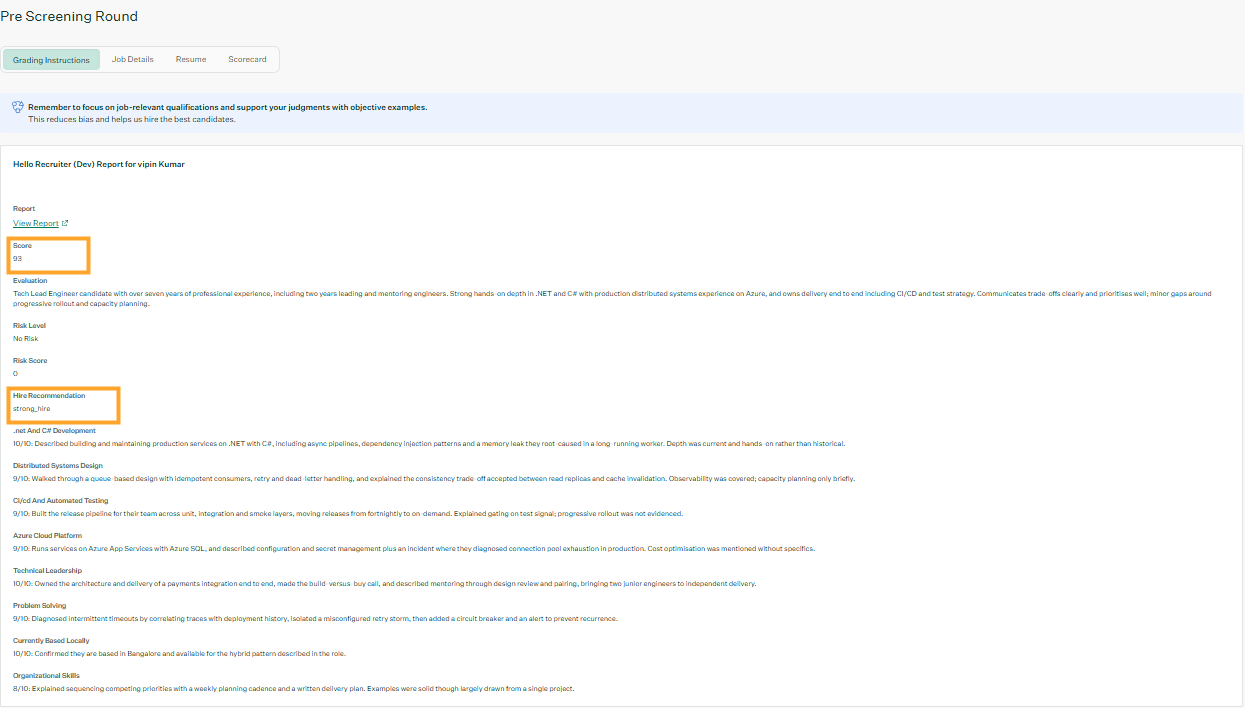
The Hello Recruiter report rendered in the Greenhouse interview kit
What Appears in Greenhouse
Results typically appear within minutes of a candidate completing their interview. The full report — transcript, recordings, and detailed scoring — always remains one click away in Hello Recruiter.
Security & Data Handling
- Read-mostly access — the connection reads jobs, candidates, and applications; its only write permissions are adding notes and filing scorecards.
- Encrypted at rest — credentials, webhook secrets, and API keys are encrypted before storage and never logged.
- Verified webhooks — every webhook delivery is verified with an HMAC signature before it’s processed; unsigned or tampered payloads are rejected.
- Tenant isolation — all synced data is scoped to your organization and never shared across accounts.
- Limited retention — raw webhook payloads are automatically purged after a retention window.