Who is this for? Users with the Administrator role on Enterprise plans. An administrator connects Ashby from Organization Settings → Integrations — no engineering work required on your side.
Connect Ashby once, and Hello Recruiter runs AI interviews as a natural part of your pipeline. Add Hello Recruiter to any stage of an interview plan and candidates are interviewed the moment they reach it — and our deepest write-back lands everything — scores, scorecards, notes, and the full report — right on the Ashby profile your team already works in.
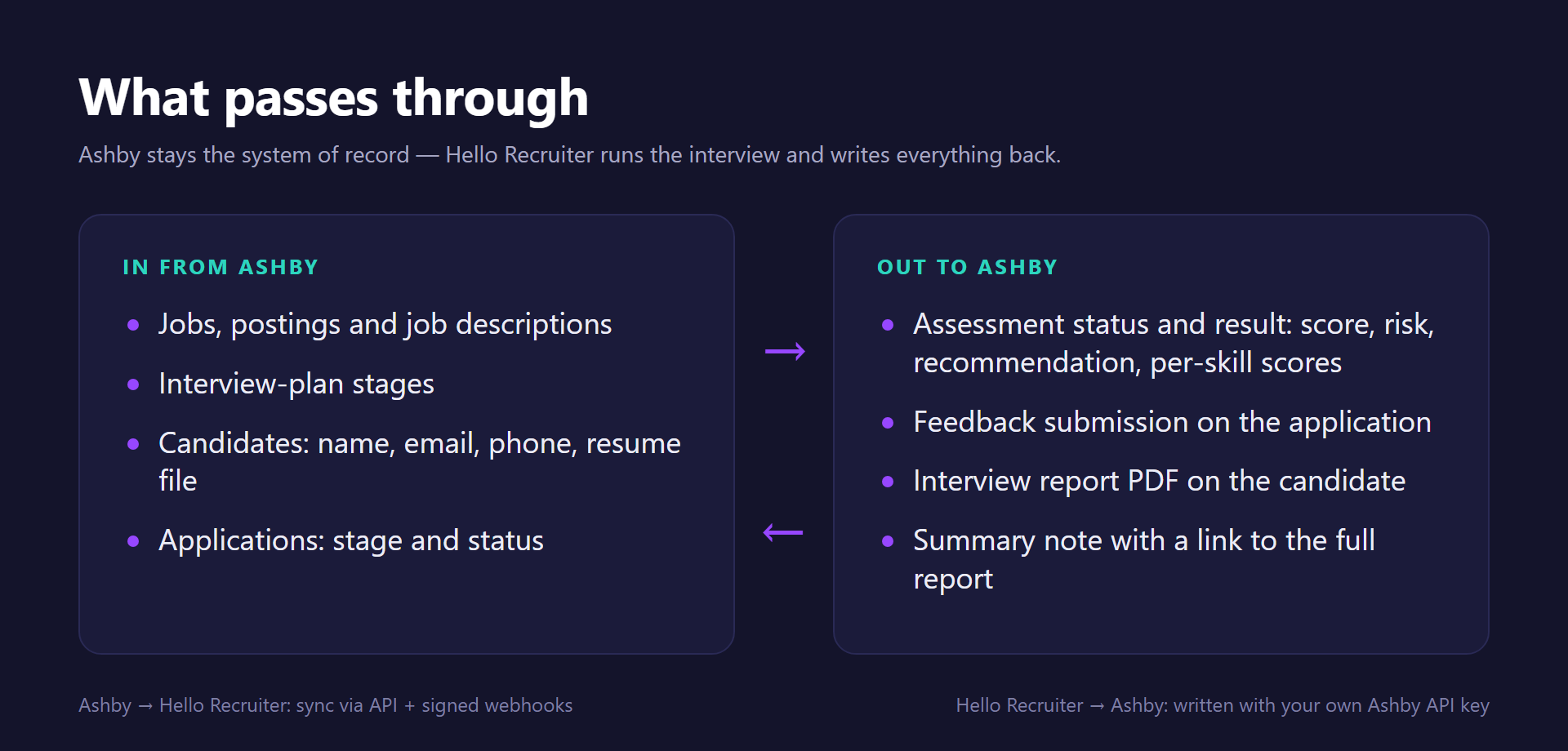
Data flow between Ashby and Hello Recruiter

Jobs, interview plans, candidates, and applications flow in from Ashby — assessment results, scorecards, notes, and reports flow back

What You Get

  • Automatic job import & AI interview setup — your open Ashby jobs sync into Hello Recruiter automatically. Job descriptions are parsed, and evaluation criteria and interview questions are generated for each role, so every job is interview-ready without manual setup.
  • Real-time candidate sync — new applications, candidate updates, and stage changes flow in via webhooks the moment they happen, with incremental sync keeping everything consistent. Resumes already on the Ashby candidate are pulled in too.
  • Interview-plan triggered interviews — add Hello Recruiter as an activity on any stage of an Ashby interview plan. When a candidate enters that stage, Ashby starts the assessment and the candidate receives an AI interview invite automatically. No exports, no copy-pasting emails.
  • Scores on the assessment — the overall fit score, risk level, hire recommendation, and a per-skill breakdown appear on the candidate’s Hello Recruiter assessment in Ashby, with status updating from started to complete on its own.
  • A structured scorecard — Hello Recruiter submits real Ashby feedback on the application, including an overall recommendation, so AI interview results sit alongside your team’s own evaluations.
  • A rich summary note — a formatted note with the score, summary, skill highlights, and a clickable link to the full report is added to the candidate’s feed.
  • The full report as a PDF — the complete interview report is uploaded to the candidate’s profile, so the evidence lives in Ashby permanently.
  • Interview plan mirroring (optional) — mirror your Ashby interview stages and keep candidate positions in sync as they move through your pipeline (one-way, Ashby → Hello Recruiter).

Connect Ashby to Hello Recruiter

1

Create an Ashby API key

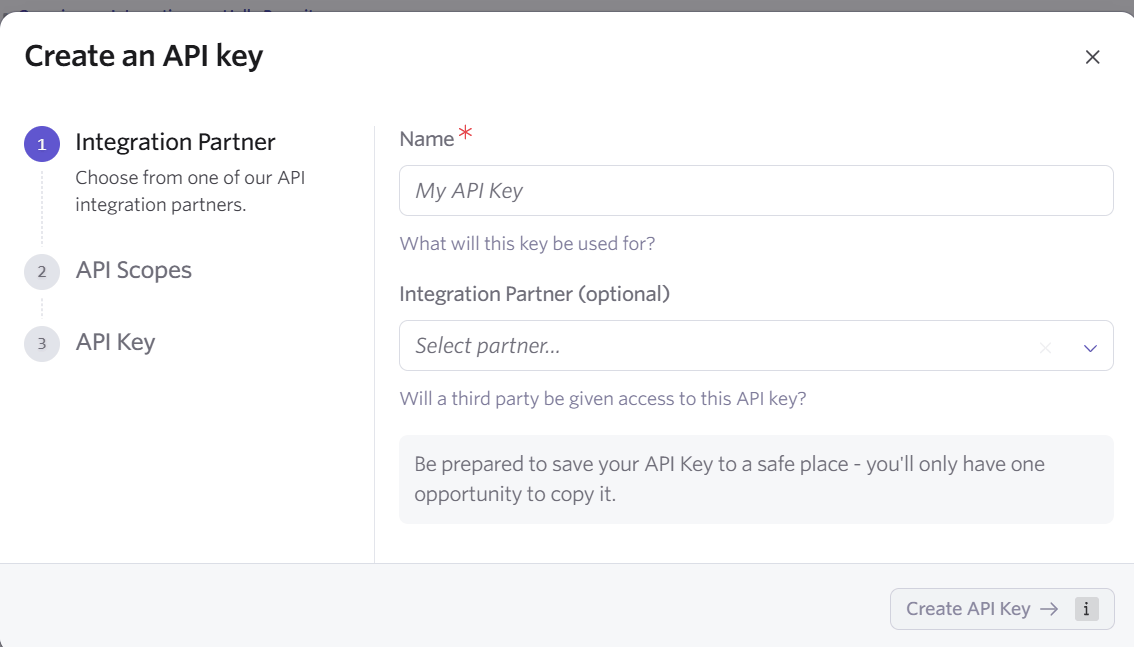
In Ashby, go to AdminAPI Keys+ New. Name the key Hello Recruiter and grant the permissions in the table below. Copy the key — Ashby shows it once.
2

Connect in Hello Recruiter

In Hello Recruiter, open Organization SettingsIntegrations, find the Ashby card, click Connect, and paste the key into the API key field. The card shows Syncing while your jobs, interview plans, candidates, and applications are imported, then Connected.
3

Webhooks are provisioned automatically

The moment the connection succeeds, Hello Recruiter registers its webhook subscriptions through the Ashby API — new applications, stage changes, candidate updates, hires, and job changes — each verified with a signing secret. If your key doesn’t include API Keys – Write, the success panel shows a Webhook URL and Webhook secret instead: add them once in Ashby under AdminWebhooks.
4

Enable the Hello Recruiter tile in Ashby
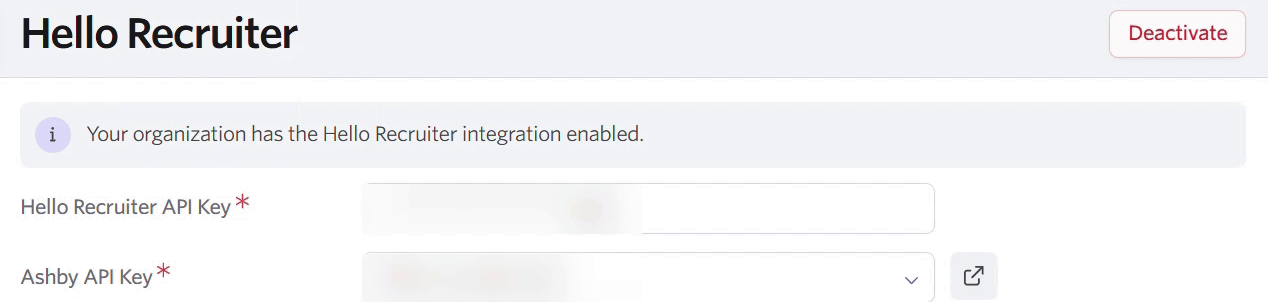
We issue your Hello Recruiter API key and share it with you securely. In Ashby, go to AdminIntegrationsHello Recruiter, click Enable, and paste the key. This is what lets Ashby start assessments and offer your jobs in the interview plan.
Ashby Create an API key dialog with the Name field and the optional Integration Partner selector

Admin → API Keys → + New — name the key and pick Hello Recruiter as the partner
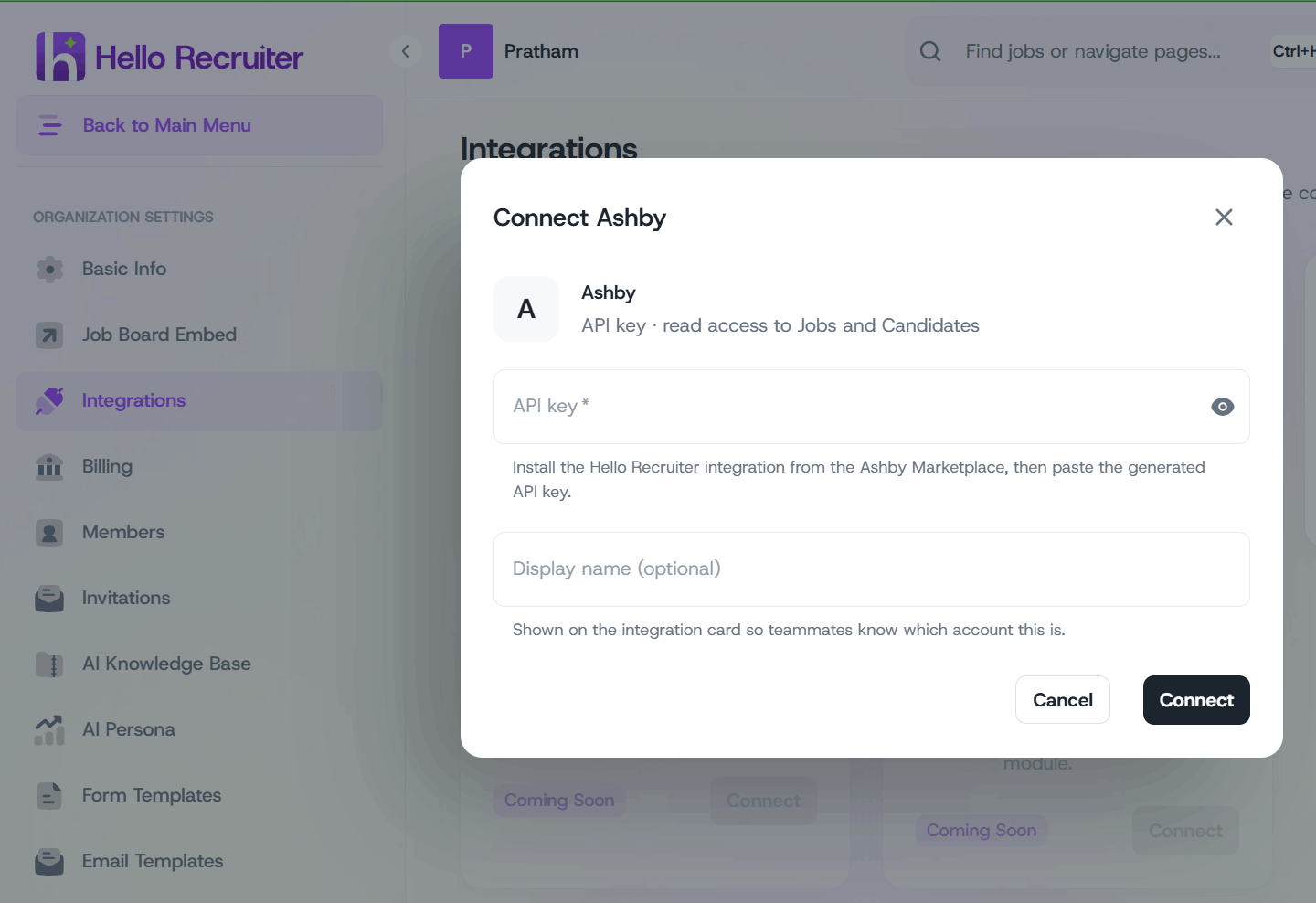
Hello Recruiter Integrations page with the Ashby Connect dialog open and the API key field filled

Organization Settings → Integrations — connect Ashby with your API key
Both keys are shown once and are unique to your organization — treat them like passwords. Rotating the Hello Recruiter key on the Ashby tile invalidates the previous key immediately. If either key is ever exposed, contact support@hellorecruiter.ai and we’ll rotate it with you.
Ashby showing the Hello Recruiter integration enabled, with the Hello Recruiter API Key and Ashby API Key fields redacted

Admin → Integrations → Hello Recruiter — enable the tile with your Hello Recruiter API key

Once the tile is enabled, every open job with a published posting is available as a Hello Recruiter assessment in your interview plans.

Add Hello Recruiter to an Interview Plan

1

Open the job's interview plan

In Ashby, open the job and go to Interview Plan.
2

Add the activity to a stage

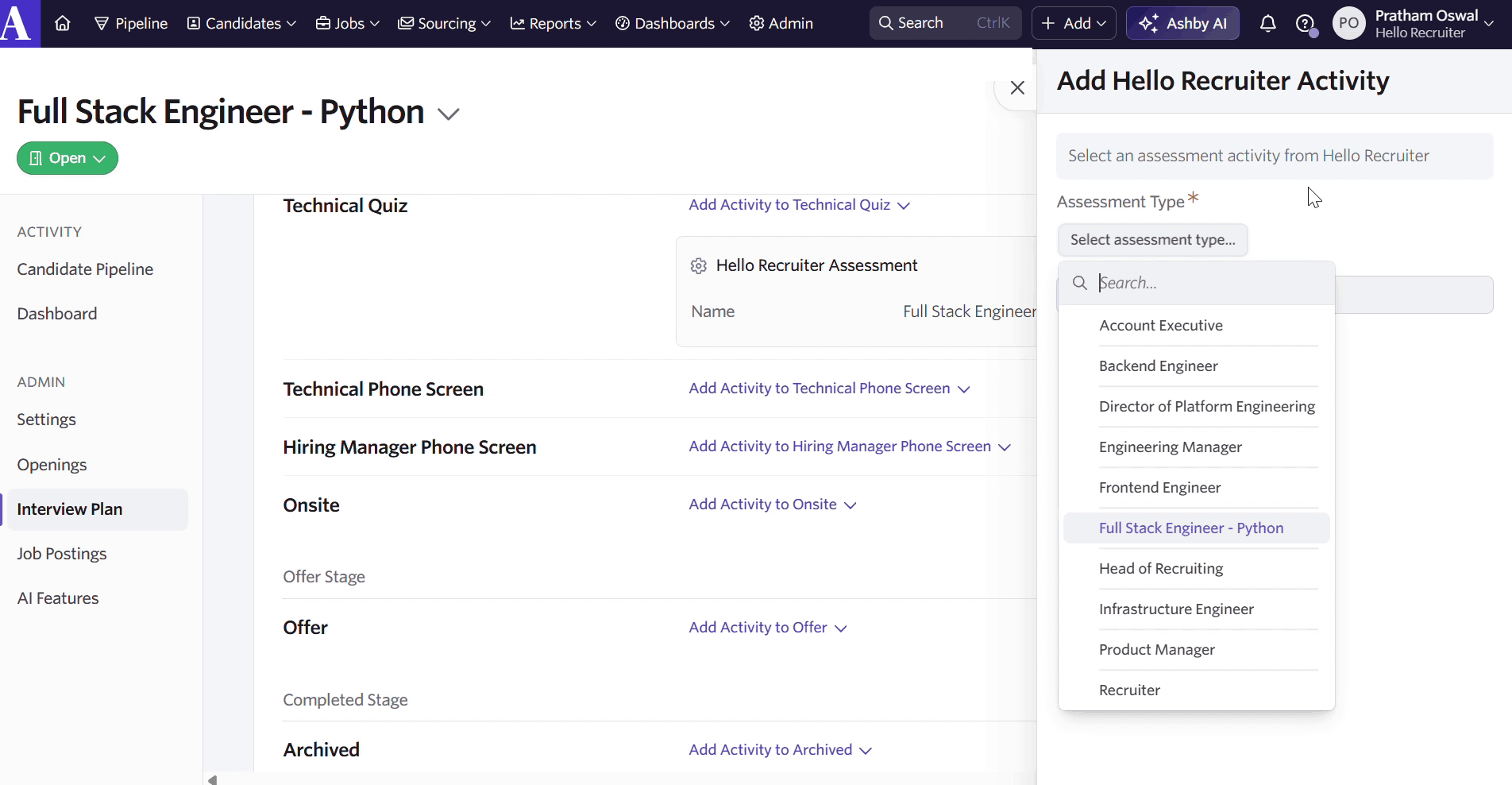
On the stage where you want the interview to happen, click + Activity, choose Hello Recruiter, and select the job’s assessment from the list. Save the plan.
3

Position it in your plan

Most teams put it right after application review or the recruiter screen, so every candidate who clears the first look is interviewed consistently.
Ashby interview plan stage with the Add Activity picker showing Hello Recruiter and the list of available assessments
  • Activity — add the Hello Recruiter assessment to a stage
Rolling it out across jobs? Interview plans shared between jobs are fully supported — add the activity once to the shared plan and every job using it gets the interview.

Interview a Candidate

1

Move the candidate into the stage

Advance the candidate to the stage that carries the Hello Recruiter activity — one at a time or in bulk. Ashby starts the assessment automatically and the activity shows Started.
2

The candidate interviews on their own schedule

They complete a live AI interview whenever suits them. The assessment status on the candidate updates automatically when they finish.
Prefer a manual gate? Leave the candidate outside the stage and click Start Assessment on their profile when you’re ready — the same interview starts either way.
One open assessment per candidate per job. If a candidate is already being assessed for that job, Ashby shows “Cannot start assessment that has already been started.” Cancel the open assessment first if you need to re-assess.

Review Results in Ashby

When the interview completes, open the candidate. Results are written to the places your team already looks:
  • Score — the overall fit score out of 100 on the Hello Recruiter assessment.
  • Risk Level and Risk Score — integrity signals from the interview session.
  • Hire Recommendation — strong hire, hire, neutral, or no hire.
  • Per-skill scores — each evaluated skill scored on the assessment, so you can see where the candidate is strong and where the gaps are.
  • Scorecard — a feedback submission on the application with the overall recommendation and a scored summary. If your organization has a feedback form titled Hello Recruiter, we fill its per-skill fields.
  • Summary note — posted to the candidate’s activity feed with the score, recommendation, and a link to the full report.
  • Full report PDFhello-recruiter-interview-report-<date>.pdf in the candidate’s Files, with the transcript, evidence, and detailed scoring.
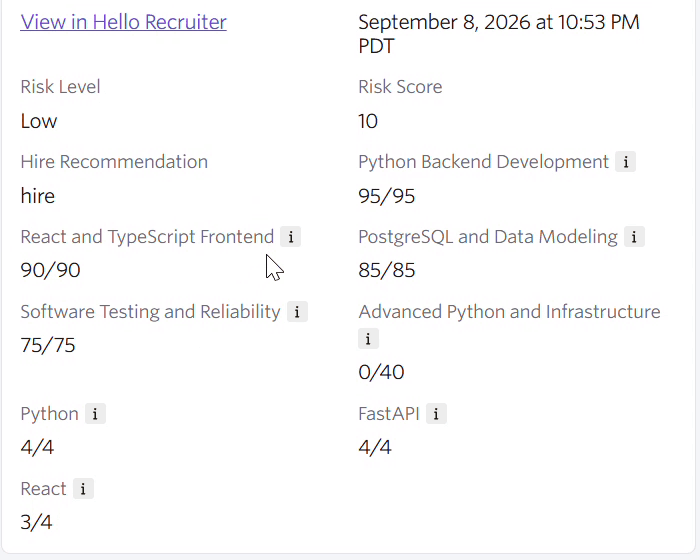
Ashby assessment details showing risk level, risk score, hire recommendation and per-skill scores against their maximums

The Hello Recruiter assessment expanded — risk level, hire recommendation, and per-skill scores
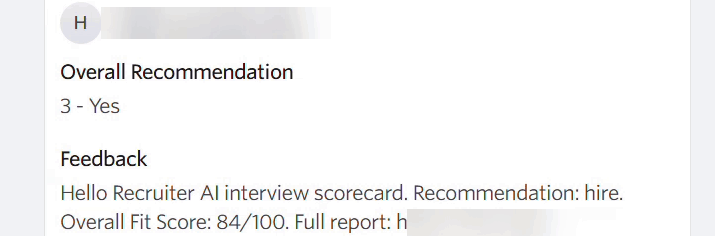
Ashby application feedback showing the Hello Recruiter submission with overall recommendation and summary

Feedback on the application — the Hello Recruiter scorecard

Sharing with the hiring team? The PDF on the candidate is the complete report — anyone with access to the Ashby candidate can read it, no Hello Recruiter seat needed. The link in the note opens the live report with recordings.

What Appears in Ashby

Results typically appear within minutes of a candidate completing their interview. Ashby receives the most complete write-back of any Hello Recruiter integration — assessment, scorecard, note, and PDF report all land automatically.

Troubleshooting

The Hello Recruiter tile isn’t enabled yet, or the Hello Recruiter API key on the tile is missing or was rotated. Check AdminIntegrationsHello Recruiter in Ashby. Only jobs with a published job posting are offered as assessments — a job without a posting has no description to build the interview from.
The candidate needs an email address on their Ashby record — Ashby shows the reason on the activity when a start is rejected. Candidates without a resume are still interviewed, on the job description alone; they show as not screened in Hello Recruiter until a resume is added.
That candidate already has an open Hello Recruiter assessment for this job. Cancel it on the activity and start again, or wait for the open interview to complete.

Security & Data Handling

  • Least-privilege access — the API key uses the minimum permission set; write access covers only assessment results, feedback, notes, and file uploads on candidates.
  • Encrypted at rest — API keys and webhook secrets are encrypted before storage and never logged.
  • Verified webhooks — every webhook delivery is verified with an HMAC signature before it’s processed; unsigned or tampered payloads are rejected.
  • Tenant isolation — all synced data is scoped to your organization and never shared across accounts.
  • Limited retention — raw webhook payloads are automatically purged after a retention window.
  • Clean disconnect — disconnecting Ashby from Organization Settings → Integrations removes the webhooks we registered; revoking the Ashby API key stops all reads and writes immediately.
Questions about data handling? See Privacy & Data Retention for how Hello Recruiter stores and retains candidate data.

Integrations Overview

Greenhouse Integration

Evaluation Criteria

Candidate Scorecard