

Who is this for? Users with Administrator and Recruiter roles.
Editing a Job
You can update the details of any job that is currently in Draft or Active status.1
Navigate to the Job
Go to the Jobs section from the left-hand menu and find the job you want to edit.
2
Open Job Details
Click the View Job button to open the job details page.
3
Edit Fields
Click the Edit button to modify the Job Description. Other fields like Experience, Salary, Skills, and Location can be edited directly on the job details page.
4
Changes Save Automatically
All edits are saved in real time — there’s no “Save” button to click. Navigate away when you’re done.
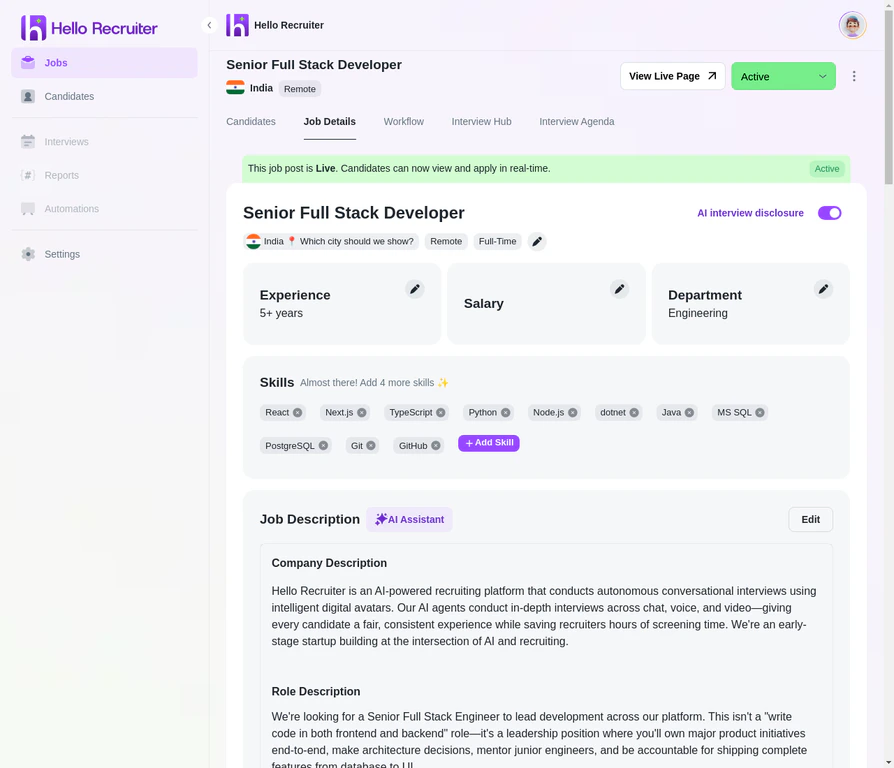
Editing a Job
What You Can Edit on an Active Job
Changes only affect future candidates. If you update evaluation criteria or the interview agenda, candidates who have already interviewed won’t be re-evaluated. Their original scorecards remain intact.
Closing a Job
When a position is filled or you’ve decided to pause hiring:1
Find the Job
Navigate to the Jobs section from the left-hand menu.
2
Change the Status
Click the status dropdown (currently showing “Active”) and select Closed.
3
Confirm
The job is removed from your public career page and moved to the Closed tab in your dashboard.
What Happens When You Close a Job
- The job is removed from your career page — candidates can no longer find or apply to it
- Pending interviews expire — candidates who haven’t started their interview will no longer be able to
- All existing data is preserved — candidate profiles, scorecards, interview recordings, and risk signals remain accessible in your dashboard
- You can re-open it later — change the status back to Active if you need to resume hiring for the same role