

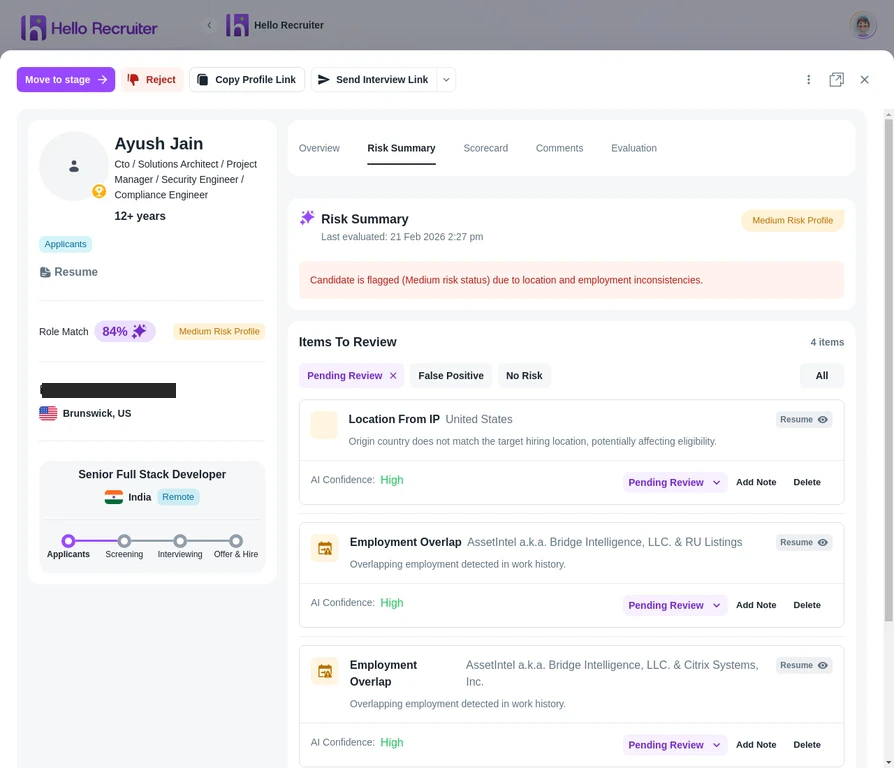
The Risk Summary tab on a candidate's profile
Types of Risk Signals
Unauthorized AI Usage
Impersonation
Fraudulent Applications
Environment Anomalies
How Risk Signals Appear
When a candidate is flagged, you’ll see:- A warning badge on their profile in the candidate list
- A detailed Risk Summary tab in their scorecard
- Specific evidence explaining what triggered the flag
What to Do with Flagged Candidates
Risk signals are informational — they don’t automatically reject candidates. You decide what action to take:- Review the evidence to understand the severity
- Compare with the candidate’s overall performance — minor flags with strong scores may warrant a follow-up interview
- Reject if the evidence is clear — blatant fraud or impersonation should disqualify candidates