

Who is this for? Users with the Organisation Administrator and Recruiter roles.
Compare Candidates
1
Select candidates
On the job’s Candidates page, tick the boxes next to 2 to 4 candidates. A bar appears at the top showing how many are selected (for example 4 Selected).
2
Add them to Compare
Click ⋮ in that bar and choose Add to Compare. You can also use Add to Compare from a candidate’s row menu, or Compare in a candidate’s profile.
3
Compare now
A message confirms how many candidates are ready, for example 4 candidates ready to compare. Four is the most you can compare at once. Click Compare now.
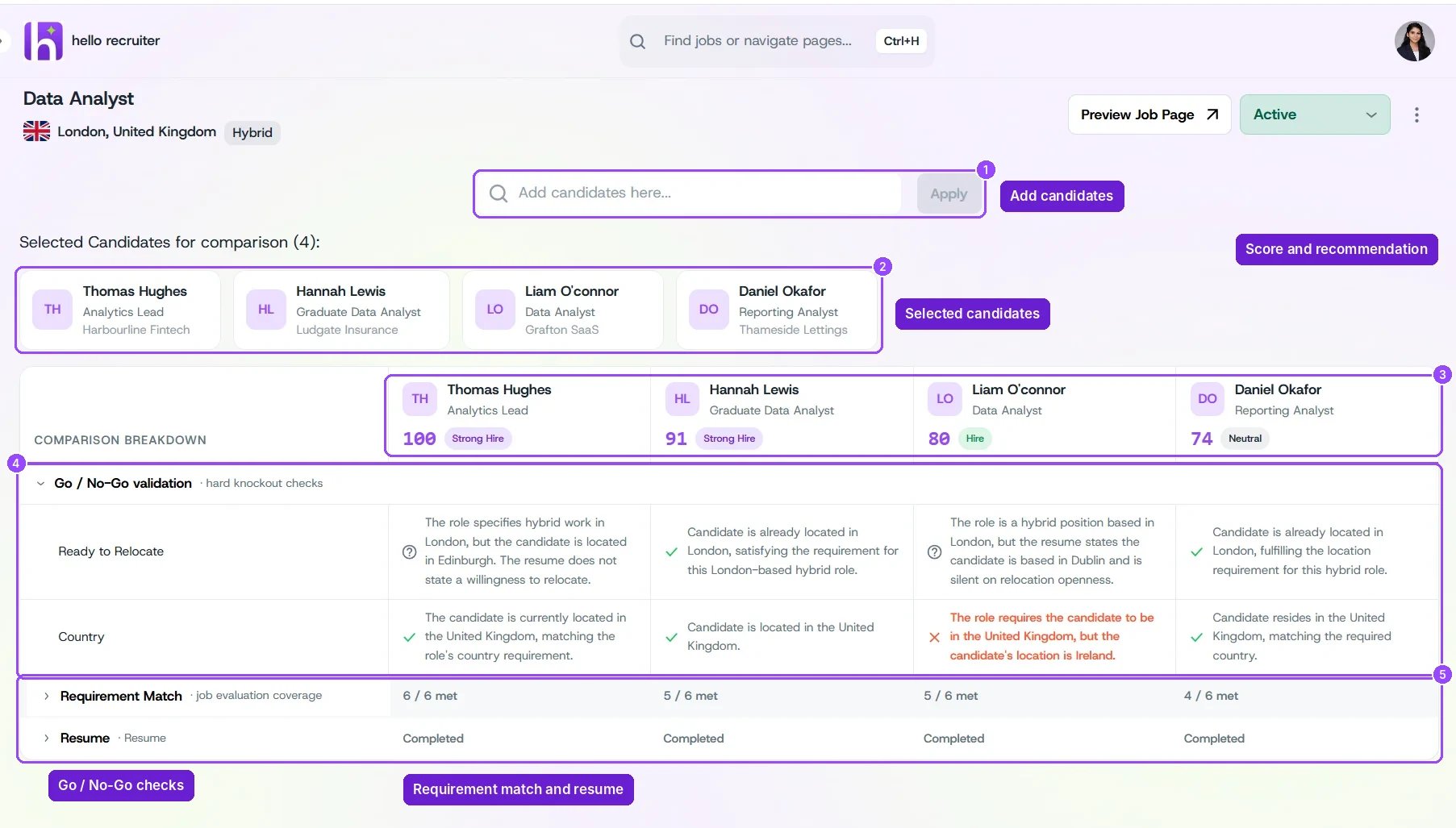
Comparison Hub with four candidates
What the Comparison Shows
Selected Candidates for comparison lists who’s included. The Comparison Breakdown puts them in columns, each headed by the candidate’s score and verdict (for example 100 Strong Hire or 74 Neutral). Below, each row compares one thing:
Click the arrow next to a row to expand or collapse it.