

Who is this for? Users with the Organisation Administrator and Recruiter roles.
AI Job Description Generator
Write the Description While Creating a Job
1
Start creating a job
On the Jobs dashboard, click + Create New Job and fill in the role name, location, workplace type, and employment type. Click Next.
2
Write or generate the description
In Add Job Description, paste your existing description or start typing. Then use the AI tools under the editor:
- Complete Job Description — the AI writes a full description from what you’ve entered.
- Rewrite — rewrites your text.
- Fix Spelling And Grammar — corrects spelling and grammar without changing your meaning.
3
Check it against the Job Checklist
Click Start AI Job Analysis in the Job Checklist panel to check the description for job title clarity, a concise company overview, key responsibilities, required and preferred qualifications, compensation and benefits transparency, bias-free language, and length.
4
Review and continue
Review the text, adjust any company-specific details, and click Continue.
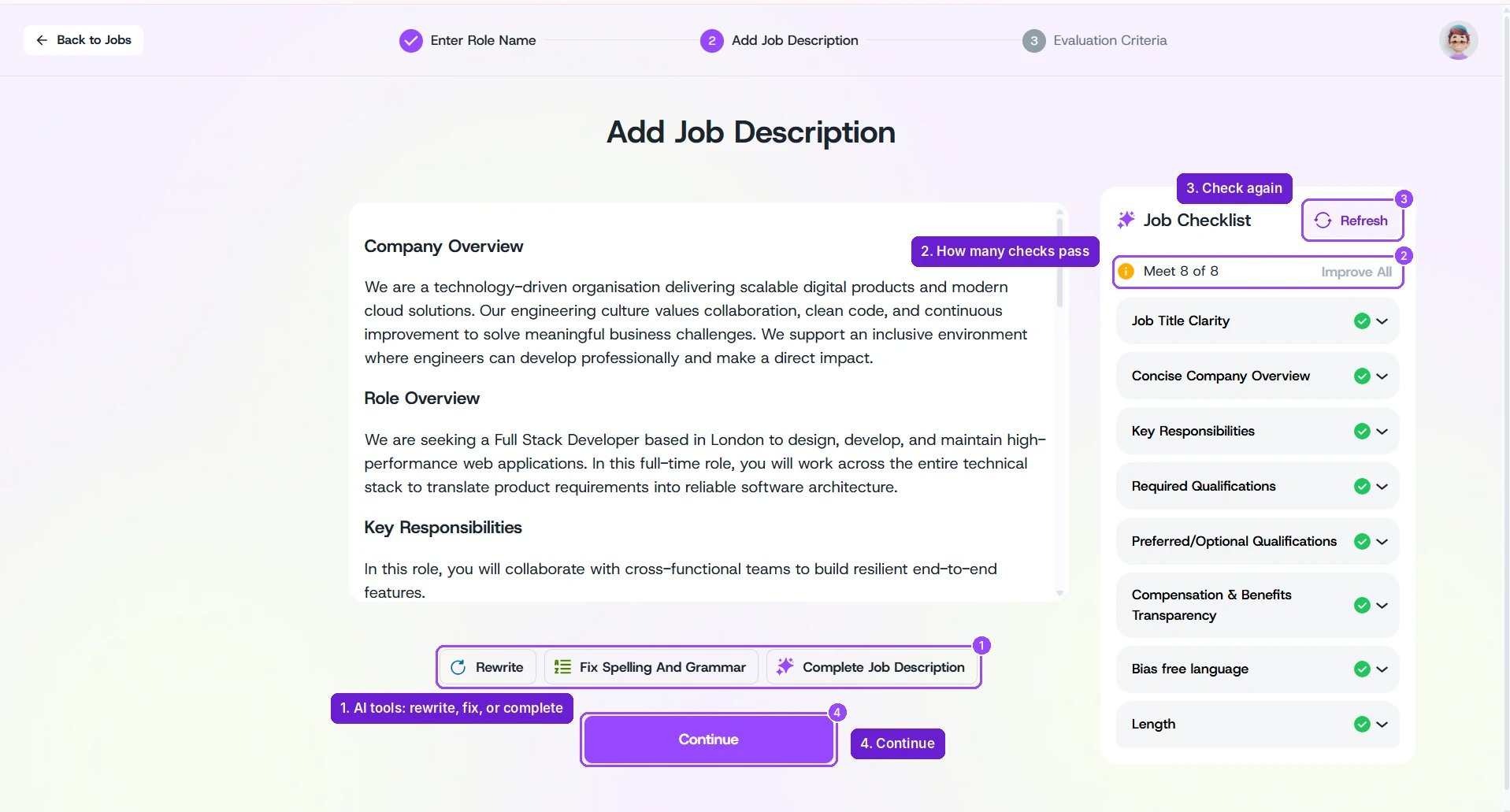
Add Job Description with the AI tools and Job Checklist
Improving the Description of an Existing Job
Open the job and go to Job Details. In the Job Description section:- Click Edit to change the text yourself.
- Click AI Assistant to have the AI refine it — for example, to improve clarity and structure or remove biased language.