
Step-by-Step Instructions
Follow these steps to get your new job opening live and start sourcing candidates.
- From your main dashboard, navigate to the Jobs section in the left-hand menu.
- Click the + Create New Job button, located in the middle of the page.
- Fill in the Core Details:
- Enter the Role Name (e.g., "Senior Software Engineer").
- Add the Job Description (e.g., "Mumbai, India" or "Remote").
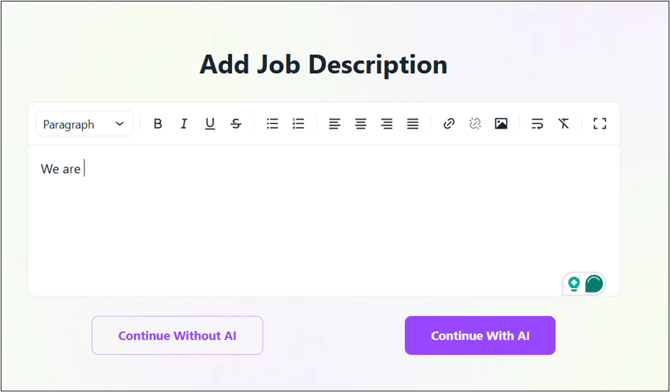
- Create the Job Description:
- You have two options:
- Use AI: Click the Generate with AI button. Provide a few keywords or a simple sentence, and our AI will create a comprehensive and optimized job description for you.
- Manual Entry: If you already have a description, you can copy and paste it directly into the Job Description text box.
- You have two options:
- Customize/Enhance the Job Description:
- The draft job post will be visible on your screen.
- Enter relevant details in the fields for Experience, Salary, Department, Skills and others.
- Select the applicable Perks and Benefits.
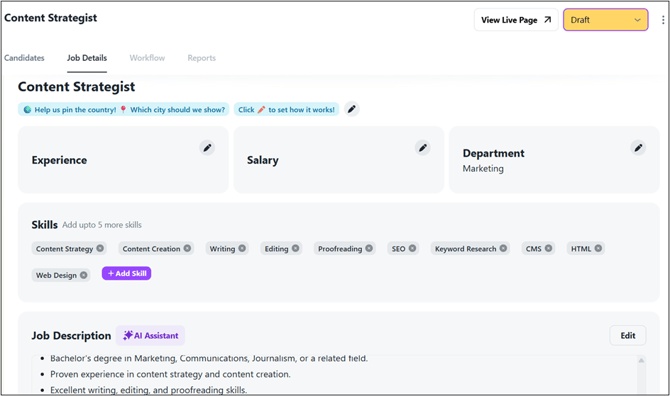
- Publish Your Job:
- Review all the details you have entered.
- Once you are ready, change the status from Draft to Active.
- Your job will now be live on your company's career page and will be sent to any integrated job boards.
Pro-Tips / Best Practices
- Leverage the AI Generator: We highly recommend using the Generate with AI feature for your job description. It is designed to use inclusive language and SEO best practices to attract a more diverse and qualified pool of applicants.
- Double-Check the Hiring Team: Ensure the correct Recruiter and Hiring Manager are assigned. This is crucial for sending candidate notifications and maintaining a smooth internal workflow.
Related Articles
- Using AI to Generate Effective and Unbiased Job Descriptions
- What do the Different Candidate Statuses Mean?
- Customizing Application Forms and Questions