> ## Documentation Index
> Fetch the complete documentation index at: https://docs.hellorecruiter.ai/llms.txt
> Use this file to discover all available pages before exploring further.
# Take-Home Follow-Up Call
> Add a short live call after a take-home assessment, where the AI interviewer walks the candidate through the work they submitted and updates the scorecard with what they explain.
**Who is this for?** Users with **Administrator** and **Recruiter** roles.
A follow-up call is a short live conversation that happens after a candidate submits their [take-home assessment](/companies/jobs/take-home-assessment). Nix, the AI interviewer, opens the files the candidate sent and asks them to explain a few of the choices they made. What they explain updates that round's scorecard, so you can tell whether the candidate understands and stands behind the work they handed in.
**Video walkthrough coming soon.** A short video of the follow-up call from the recruiter's side will appear here.
## At a Glance
| | |
| - | - |
| **Length** | About 20 minutes |
| **Interviewer** | Nix, the same AI interviewer that runs your take-home round |
| **What it covers** | Only the work the candidate submitted — there's nothing new for them to prepare |
| **Format** | Camera on, no screen share. The candidate's files are open on the interviewer's side |
| **Effect on the score** | Updates the take-home scorecard, up or down, based on what the candidate explains |
| **If they skip or miss it** | Nothing is held against them. Their submission is still reviewed and keeps the score it earned |
## Turning On the Follow-Up Call
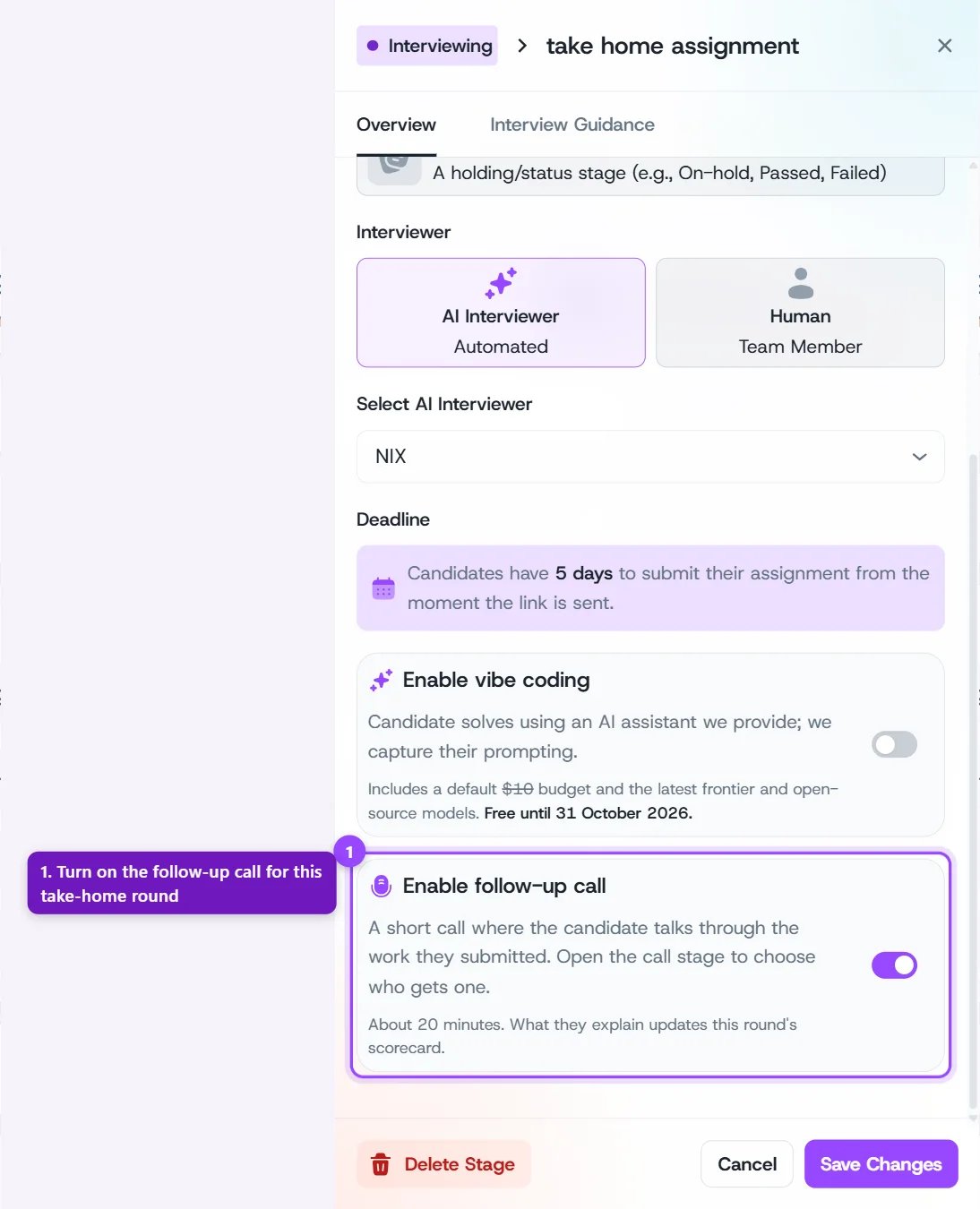
Go to the job's **Workflow** tab and click your take-home round to open its settings.
Scroll down to the **Enable follow-up call** card and turn it on.
Click **Save Changes**.
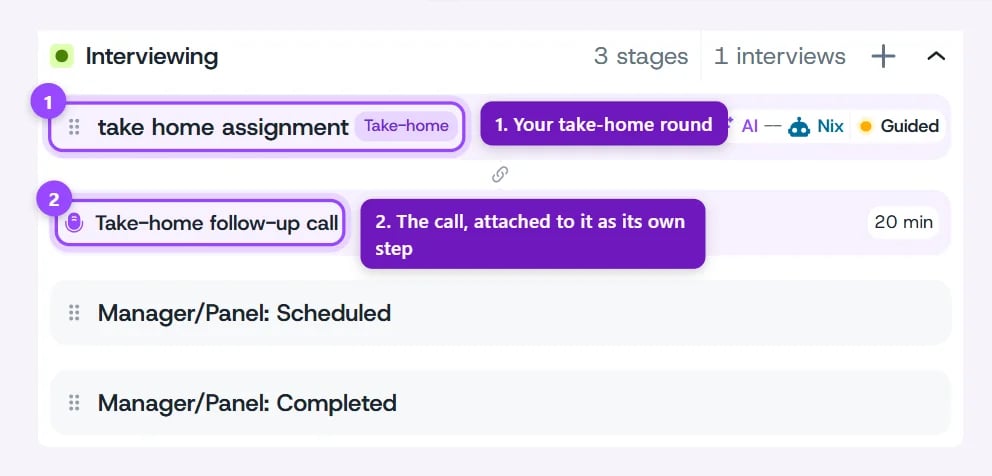
 Once it's on, the call appears in your workflow as its own step, **Take-home follow-up call**, attached directly under the take-home round.
 ## Choosing Who Gets a Call
Click the **Take-home follow-up call** step to open its settings. Under **Who gets a call**, pick one of two options:
| Option | What happens |
| - | - |
| **Everyone who submits** | The call is ready the moment a candidate uploads their assignment. They start it right away from their assignment page. This is the default. |
| **Only the candidates you pick** | Nobody is called until you ask. You request a call for specific candidates after reviewing their submission, and they're emailed the link. |
## Choosing Who Gets a Call
Click the **Take-home follow-up call** step to open its settings. Under **Who gets a call**, pick one of two options:
| Option | What happens |
| - | - |
| **Everyone who submits** | The call is ready the moment a candidate uploads their assignment. They start it right away from their assignment page. This is the default. |
| **Only the candidates you pick** | Nobody is called until you ask. You request a call for specific candidates after reviewing their submission, and they're emailed the link. |
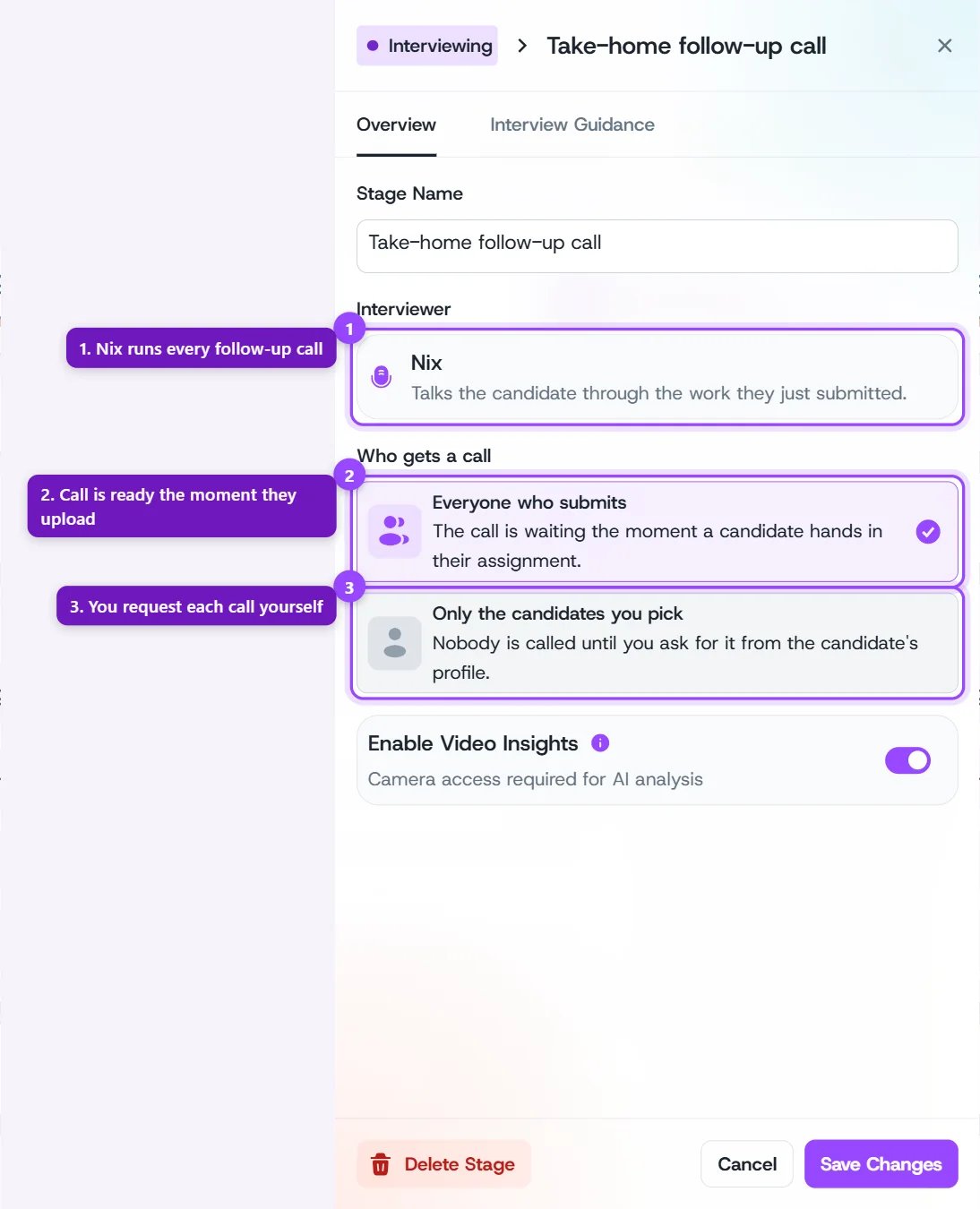 **Everyone who submits** gives you a call for every candidate with no extra work. **Only the candidates you pick** suits high-volume roles, where you'd rather spend calls on the submissions you're seriously considering.
The call's length is fixed at about 20 minutes. It also has the same **Enable Video Insights** switch as your other AI interview rounds.
## Steering What the Call Covers
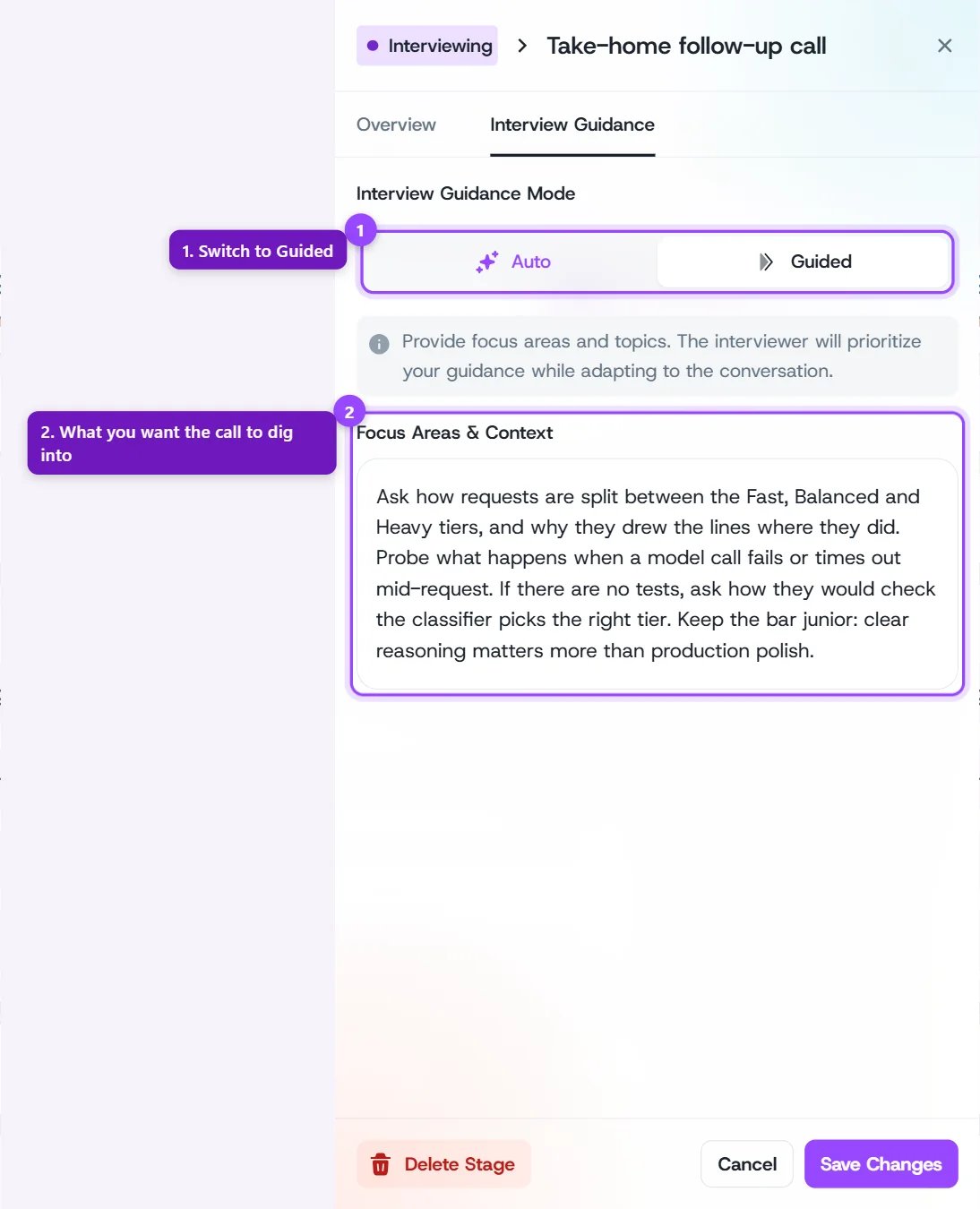
The call works out of the box: Nix reads the assignment, the files the candidate submitted, and their take-home scorecard, and picks the parts worth talking through. If you want it to dig into something specific, open the call step's **Interview Guidance** tab and switch to **Guided**. Whatever you write under **Focus Areas & Context** becomes Nix's brief for the call.
**Everyone who submits** gives you a call for every candidate with no extra work. **Only the candidates you pick** suits high-volume roles, where you'd rather spend calls on the submissions you're seriously considering.
The call's length is fixed at about 20 minutes. It also has the same **Enable Video Insights** switch as your other AI interview rounds.
## Steering What the Call Covers
The call works out of the box: Nix reads the assignment, the files the candidate submitted, and their take-home scorecard, and picks the parts worth talking through. If you want it to dig into something specific, open the call step's **Interview Guidance** tab and switch to **Guided**. Whatever you write under **Focus Areas & Context** becomes Nix's brief for the call.
 Good things to put in your guidance:
* The design decision or trade-off you most want the candidate to defend
* Parts of the brief that were easy to skip, to check whether they skipped them on purpose
* How deep to go technically for this role's seniority
## Requesting a Call
With **Only the candidates you pick**, you start each call yourself. You can also use this to give a candidate another chance if they missed or skipped their call.
Open the candidate's profile, or tick one or more candidates on the job's candidate list or Kanban board. Pick them one by one: a whole-stage "select all" can't be used to request calls.
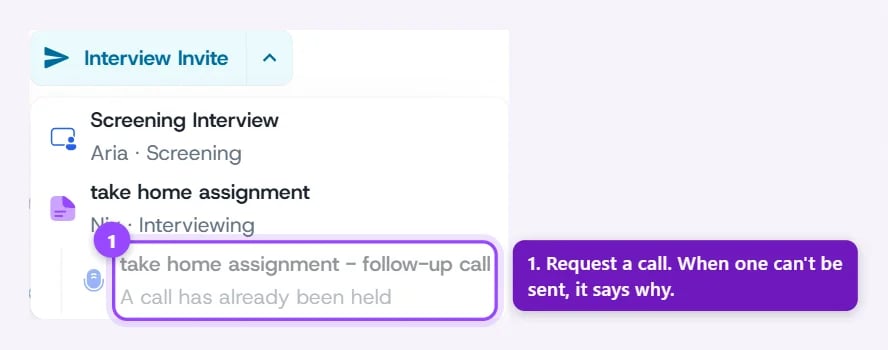
Open the **Interview Invite** menu. Under your take-home round, choose **\[round name] - follow-up call**.
In the **Request follow-up call** dialog, click **Request call**. Choose **Move & request call** instead to also move the candidate into the follow-up call step.
Good things to put in your guidance:
* The design decision or trade-off you most want the candidate to defend
* Parts of the brief that were easy to skip, to check whether they skipped them on purpose
* How deep to go technically for this role's seniority
## Requesting a Call
With **Only the candidates you pick**, you start each call yourself. You can also use this to give a candidate another chance if they missed or skipped their call.
Open the candidate's profile, or tick one or more candidates on the job's candidate list or Kanban board. Pick them one by one: a whole-stage "select all" can't be used to request calls.
Open the **Interview Invite** menu. Under your take-home round, choose **\[round name] - follow-up call**.
In the **Request follow-up call** dialog, click **Request call**. Choose **Move & request call** instead to also move the candidate into the follow-up call step.
 The candidate is emailed a link and has **48 hours** to start the call. Because it has to start before that window closes, it works best when you know they're around.
If the option is greyed out, the menu tells you why. Common reasons:
| Reason shown | What it means |
| - | - |
| *Their take-home is not reviewed yet* | The submission is still being evaluated. Try again once its scorecard is ready. |
| *A call is already waiting for them* | They already have a call they haven't started. |
| *Their call is still being written up* | The call just ended and its analysis is on its way. |
| *A call has already been held* | They've had their call. Each submission gets one completed call. |
## Timing
| | Everyone who submits | Only the candidates you pick |
| - | - | - |
| **When the call opens** | The moment the candidate uploads | When you request it |
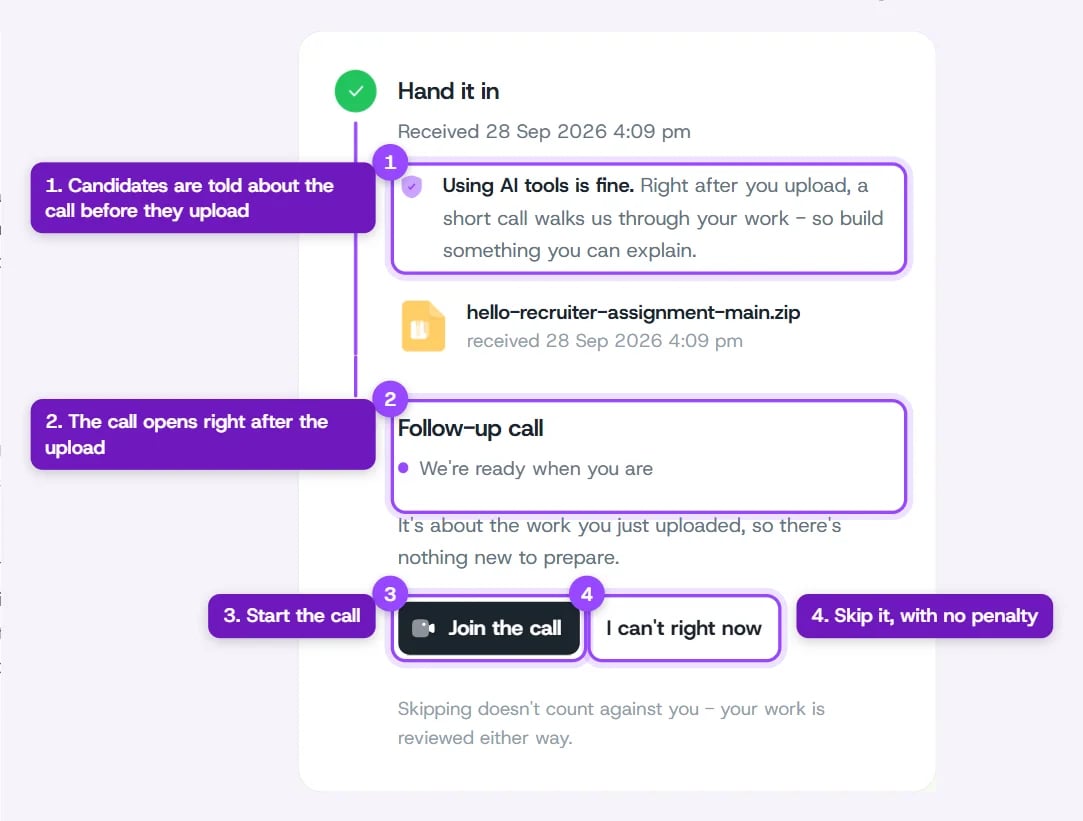
| **How the candidate hears about it** | On their assignment page, right after uploading | By email, with a link |
| **Time to start the call** | 30 minutes | 48 hours |
The candidate is emailed a link and has **48 hours** to start the call. Because it has to start before that window closes, it works best when you know they're around.
If the option is greyed out, the menu tells you why. Common reasons:
| Reason shown | What it means |
| - | - |
| *Their take-home is not reviewed yet* | The submission is still being evaluated. Try again once its scorecard is ready. |
| *A call is already waiting for them* | They already have a call they haven't started. |
| *Their call is still being written up* | The call just ended and its analysis is on its way. |
| *A call has already been held* | They've had their call. Each submission gets one completed call. |
## Timing
| | Everyone who submits | Only the candidates you pick |
| - | - | - |
| **When the call opens** | The moment the candidate uploads | When you request it |
| **How the candidate hears about it** | On their assignment page, right after uploading | By email, with a link |
| **Time to start the call** | 30 minutes | 48 hours |
 While the call is waiting, the submission shows as **Awaiting follow-up call** on the candidate's profile. If the candidate doesn't start the call in time, it's marked as not taken and the submission keeps the score it already earned. It can take up to about an hour after the window closes for the status to update.
## Reviewing the Call
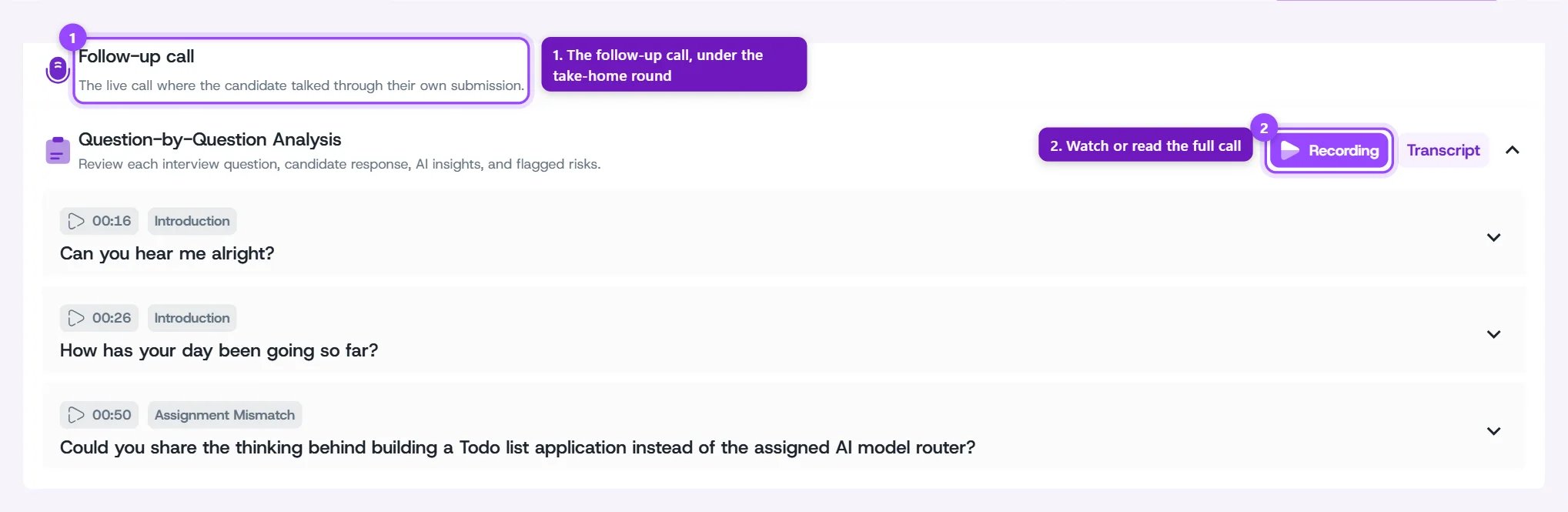
Open the candidate's profile, go to the **Evaluation** tab, pick the take-home round from the dropdown, and switch to **Interview**. Below the submission is a **Follow-up call** section with:
* **Recording** and **Transcript** buttons for the full call
* **Question-by-Question Analysis**: each question Nix asked, with a timestamp, the candidate's answer, and AI insights
While the call is waiting, the submission shows as **Awaiting follow-up call** on the candidate's profile. If the candidate doesn't start the call in time, it's marked as not taken and the submission keeps the score it already earned. It can take up to about an hour after the window closes for the status to update.
## Reviewing the Call
Open the candidate's profile, go to the **Evaluation** tab, pick the take-home round from the dropdown, and switch to **Interview**. Below the submission is a **Follow-up call** section with:
* **Recording** and **Transcript** buttons for the full call
* **Question-by-Question Analysis**: each question Nix asked, with a timestamp, the candidate's answer, and AI insights
 The take-home scorecard itself (requirement match, proficiency signals, risks and concerns) is updated with what the call settled. A candidate who clearly explains strong decisions can move up. One who can't explain their own submission can move down.
Before the call is finished, the section tells you where things stand:
| Message | Meaning |
| - | - |
| *The candidate has not taken this call yet...* | The call is on offer but hasn't started. |
| *This call is still under way...* | The call is happening now, or has just ended and is being analyzed. |
| *The candidate chose not to take this call...* | They chose to skip it. |
## Fair to Every Candidate
* **Skipping or missing the call never counts against a candidate.** Their submission is reviewed either way and keeps the score it earned.
* **The call never rejects anyone on its own.** It adds evidence to the scorecard; the hiring decision stays with you.
* **Candidates know in advance.** With **Everyone who submits**, the assignment page tells them before they upload that a short call follows. With **Only the candidates you pick**, it tells them a call may be requested.
* **Gaming the call ends it.** If a candidate keeps trying to manipulate the interviewer, is abusive, or submitted files with hidden text written to trick the AI, the call ends early. One curious question doesn't trigger this — only repeated attempts do.
The follow-up call works for any kind of take-home, not only code. Documents, slide decks, images, and data files are all opened on the call the same way source files are.
## Related Guides
This documentation is built and hosted on [Mintlify](https://mintlify.com), a developer documentation platform.
The take-home scorecard itself (requirement match, proficiency signals, risks and concerns) is updated with what the call settled. A candidate who clearly explains strong decisions can move up. One who can't explain their own submission can move down.
Before the call is finished, the section tells you where things stand:
| Message | Meaning |
| - | - |
| *The candidate has not taken this call yet...* | The call is on offer but hasn't started. |
| *This call is still under way...* | The call is happening now, or has just ended and is being analyzed. |
| *The candidate chose not to take this call...* | They chose to skip it. |
## Fair to Every Candidate
* **Skipping or missing the call never counts against a candidate.** Their submission is reviewed either way and keeps the score it earned.
* **The call never rejects anyone on its own.** It adds evidence to the scorecard; the hiring decision stays with you.
* **Candidates know in advance.** With **Everyone who submits**, the assignment page tells them before they upload that a short call follows. With **Only the candidates you pick**, it tells them a call may be requested.
* **Gaming the call ends it.** If a candidate keeps trying to manipulate the interviewer, is abusive, or submitted files with hidden text written to trick the AI, the call ends early. One curious question doesn't trigger this — only repeated attempts do.
The follow-up call works for any kind of take-home, not only code. Documents, slide decks, images, and data files are all opened on the call the same way source files are.
## Related Guides
This documentation is built and hosted on [Mintlify](https://mintlify.com), a developer documentation platform.