> ## Documentation Index
> Fetch the complete documentation index at: https://docs.hellorecruiter.ai/llms.txt
> Use this file to discover all available pages before exploring further.
# How to Edit or Close a Job Posting in Hello Recruiter
> Update a live job listing or close a filled role in Hello Recruiter. Changes auto-save, and closing preserves all candidate data.
**Who is this for?** Users with **Administrator** and **Recruiter** roles.
## Editing a Job
You can update the details of any job that is currently in **Draft** or **Active** status.
Go to the **Jobs** section from the left-hand menu and find the job you want to edit.
Click the **View Job** button to open the job details page.
Click the **Edit** button to modify the **Job Description**. Other fields like **Experience**, **Salary**, **Skills**, and **Location** can be edited directly on the job details page.
All edits are saved in real time — there's no "Save" button to click. Navigate away when you're done.
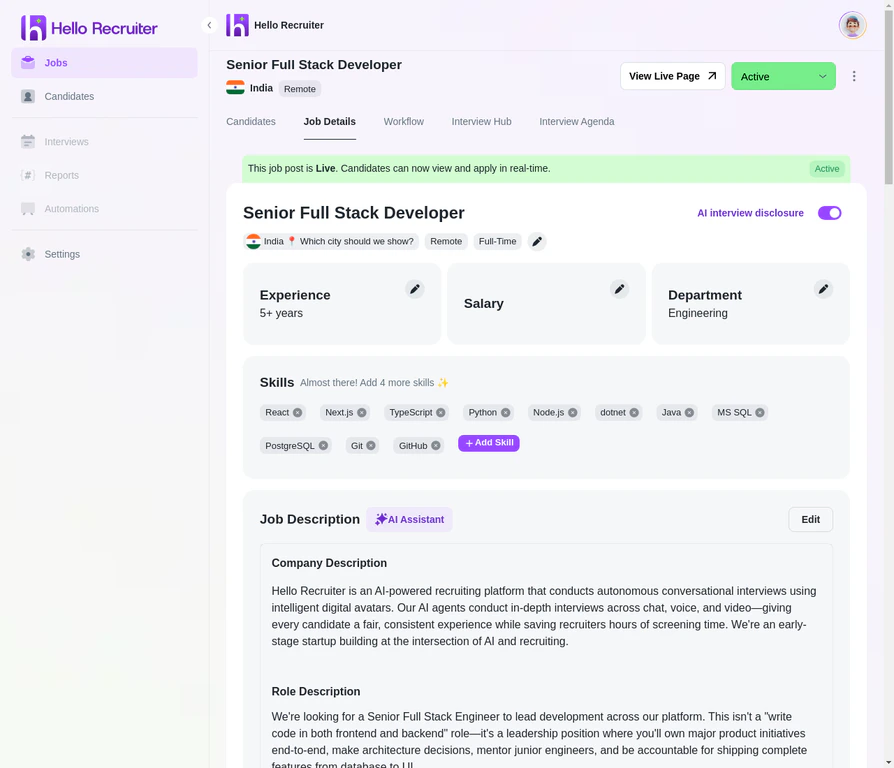 ### What You Can Edit on an Active Job
| Field | Editable? | Notes |
| ------------------- | --------- | --------------------------------------------------------------------- |
| Job title | Yes | Updates immediately on your career page |
| Job description | Yes | Click "Edit" to open the editor |
| Salary range | Yes | Updated on career page |
| Experience level | Yes | Affects how AI evaluates candidates |
| Required skills | Yes | Updates evaluation criteria |
| Location / remote | Yes | Updated on career page |
| Evaluation criteria | Yes | Applies to future interviews only — existing scorecards are unchanged |
| Interview agenda | Yes | Applies to future interviews only |
**Changes only affect future candidates.** If you update evaluation criteria or the interview agenda, candidates who have already interviewed won't be re-evaluated. Their original scorecards remain intact.
## Closing a Job
When a position is filled or you've decided to pause hiring:
Navigate to the **Jobs** section from the left-hand menu.
Click the **status dropdown** (currently showing "Active") and select **Closed**.
The job is removed from your public career page and moved to the **Closed** tab in your dashboard.
### What Happens When You Close a Job
* The job is **removed from your career page** — candidates can no longer find or apply to it
* **Pending interviews expire** — candidates who haven't started their interview will no longer be able to
* **All existing data is preserved** — candidate profiles, scorecards, interview recordings, and risk signals remain accessible in your dashboard
* **You can re-open it later** — change the status back to Active if you need to resume hiring for the same role
**Closing is not deleting.** Closing a job is reversible and preserves all data. You cannot permanently delete a job — this is by design, to protect candidate data and maintain your hiring audit trail.
## When to Edit vs. Create New
| Scenario | Recommendation |
| ------------------------------------------------------ | -------------------------- |
| Fixing a typo in the description | Edit the existing job |
| Updating the salary range | Edit the existing job |
| Refining evaluation criteria after initial interviews | Edit the existing job |
| The role's core responsibilities changed significantly | Close and create a new job |
| Different seniority level than originally posted | Close and create a new job |
| Different department or team | Close and create a new job |
**When in doubt, create new.** If the role has changed enough that existing candidates might not be a fit for the updated version, it's fairer to close the old job and start fresh. This ensures every candidate is evaluated against the same criteria.
## Related Guides
### What You Can Edit on an Active Job
| Field | Editable? | Notes |
| ------------------- | --------- | --------------------------------------------------------------------- |
| Job title | Yes | Updates immediately on your career page |
| Job description | Yes | Click "Edit" to open the editor |
| Salary range | Yes | Updated on career page |
| Experience level | Yes | Affects how AI evaluates candidates |
| Required skills | Yes | Updates evaluation criteria |
| Location / remote | Yes | Updated on career page |
| Evaluation criteria | Yes | Applies to future interviews only — existing scorecards are unchanged |
| Interview agenda | Yes | Applies to future interviews only |
**Changes only affect future candidates.** If you update evaluation criteria or the interview agenda, candidates who have already interviewed won't be re-evaluated. Their original scorecards remain intact.
## Closing a Job
When a position is filled or you've decided to pause hiring:
Navigate to the **Jobs** section from the left-hand menu.
Click the **status dropdown** (currently showing "Active") and select **Closed**.
The job is removed from your public career page and moved to the **Closed** tab in your dashboard.
### What Happens When You Close a Job
* The job is **removed from your career page** — candidates can no longer find or apply to it
* **Pending interviews expire** — candidates who haven't started their interview will no longer be able to
* **All existing data is preserved** — candidate profiles, scorecards, interview recordings, and risk signals remain accessible in your dashboard
* **You can re-open it later** — change the status back to Active if you need to resume hiring for the same role
**Closing is not deleting.** Closing a job is reversible and preserves all data. You cannot permanently delete a job — this is by design, to protect candidate data and maintain your hiring audit trail.
## When to Edit vs. Create New
| Scenario | Recommendation |
| ------------------------------------------------------ | -------------------------- |
| Fixing a typo in the description | Edit the existing job |
| Updating the salary range | Edit the existing job |
| Refining evaluation criteria after initial interviews | Edit the existing job |
| The role's core responsibilities changed significantly | Close and create a new job |
| Different seniority level than originally posted | Close and create a new job |
| Different department or team | Close and create a new job |
**When in doubt, create new.** If the role has changed enough that existing candidates might not be a fit for the updated version, it's fairer to close the old job and start fresh. This ensures every candidate is evaluated against the same criteria.
## Related Guides