> ## Documentation Index
> Fetch the complete documentation index at: https://docs.hellorecruiter.ai/llms.txt
> Use this file to discover all available pages before exploring further.
# AI-Powered Job Description Generator — Write Better Job Posts
> Generate compelling, bias-free job descriptions in seconds with Hello Recruiter's AI. Improve existing postings or create from scratch.
Hello Recruiter's AI Job Description Generator creates optimized, bias-free job postings in seconds.
## Generating a New Description
When creating a new job, you can use the AI to generate a complete job description from scratch.
Navigate to **Jobs** and click **Create New Job**. Fill in the basic role details (title, department, seniority).
In Step 2 of the job creation process, click **Complete Job Description** to let the AI generate a comprehensive posting.
The AI produces a full description. Review it, adjust any company-specific details, and refine the tone to match your brand.
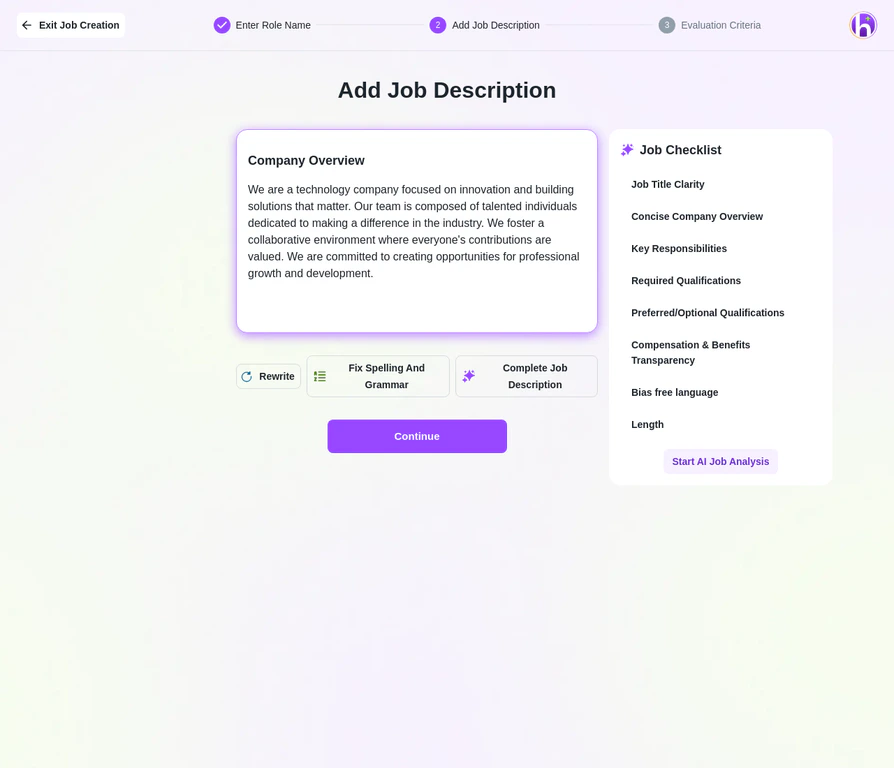 The AI produces descriptions that are optimized for search engines and use inclusive language to attract diverse candidates.
## Improving an Existing Description
Already have a job description? Paste it in and use AI to enhance it:
1. Paste your existing description into the **Job Description** field
2. Click **AI Assistant** to refine clarity, remove biased language, improve structure, and optimize for candidate engagement
The AI will suggest improvements while preserving your original intent and company voice.
## What the AI Optimizes
| Area | What It Does |
| --------------------------- | --------------------------------------------------------------------------------------------------------- |
| **Inclusive language** | Removes gendered, ageist, or exclusionary phrasing that can discourage qualified candidates from applying |
| **Clarity & structure** | Organizes responsibilities, requirements, and benefits into clear, scannable sections |
| **SEO optimization** | Includes relevant keywords so your posting ranks higher on job boards and search engines |
| **Tone consistency** | Maintains a professional yet approachable voice that reflects well on your employer brand |
| **Requirement calibration** | Flags unrealistic requirement combinations (e.g., entry-level salary with senior-level expectations) |
## Tips for Better AI Output
The more context you give the AI, the better the output. Here's what to include:
**Be specific about the role.** Instead of just "Software Engineer," provide context like: "Backend engineer on a 6-person payments team, building microservices in Go, reporting to the VP of Engineering." The AI uses this to generate a much more tailored description.
**Include your differentiators.** Tell the AI what makes this role unique — remote-first culture, equity compensation, the specific product they'll be building, or growth opportunities. Generic descriptions attract generic applicants.
**Always review AI-generated content before publishing.** While the AI produces high-quality descriptions, you should verify that technical requirements, compensation ranges, and company-specific details are accurate. The AI may not know your exact tech stack or benefit details.
## Related Guides
The AI produces descriptions that are optimized for search engines and use inclusive language to attract diverse candidates.
## Improving an Existing Description
Already have a job description? Paste it in and use AI to enhance it:
1. Paste your existing description into the **Job Description** field
2. Click **AI Assistant** to refine clarity, remove biased language, improve structure, and optimize for candidate engagement
The AI will suggest improvements while preserving your original intent and company voice.
## What the AI Optimizes
| Area | What It Does |
| --------------------------- | --------------------------------------------------------------------------------------------------------- |
| **Inclusive language** | Removes gendered, ageist, or exclusionary phrasing that can discourage qualified candidates from applying |
| **Clarity & structure** | Organizes responsibilities, requirements, and benefits into clear, scannable sections |
| **SEO optimization** | Includes relevant keywords so your posting ranks higher on job boards and search engines |
| **Tone consistency** | Maintains a professional yet approachable voice that reflects well on your employer brand |
| **Requirement calibration** | Flags unrealistic requirement combinations (e.g., entry-level salary with senior-level expectations) |
## Tips for Better AI Output
The more context you give the AI, the better the output. Here's what to include:
**Be specific about the role.** Instead of just "Software Engineer," provide context like: "Backend engineer on a 6-person payments team, building microservices in Go, reporting to the VP of Engineering." The AI uses this to generate a much more tailored description.
**Include your differentiators.** Tell the AI what makes this role unique — remote-first culture, equity compensation, the specific product they'll be building, or growth opportunities. Generic descriptions attract generic applicants.
**Always review AI-generated content before publishing.** While the AI produces high-quality descriptions, you should verify that technical requirements, compensation ranges, and company-specific details are accurate. The AI may not know your exact tech stack or benefit details.
## Related Guides