> ## Documentation Index
> Fetch the complete documentation index at: https://docs.hellorecruiter.ai/llms.txt
> Use this file to discover all available pages before exploring further.
# Understanding AI Candidate Scorecards & Evaluations
> Read AI-generated scorecards with overall scores, criteria breakdowns, key highlights, and risk signals for each interviewed candidate.
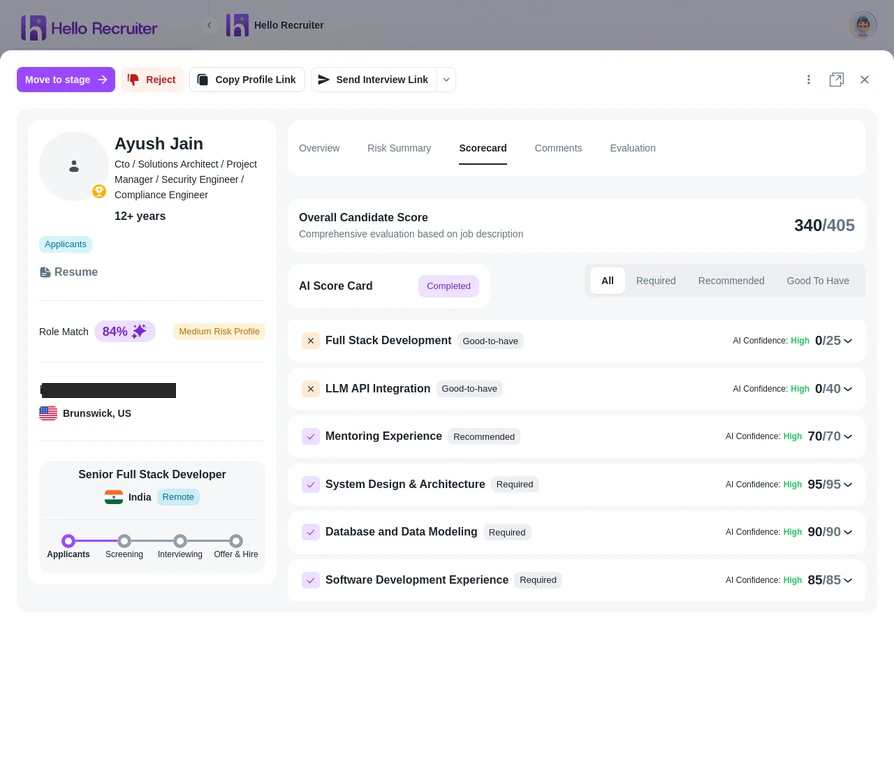
After a candidate completes their AI interview, Hello Recruiter generates a comprehensive scorecard.
 ## What's in a Scorecard?
Each scorecard includes:
* **Overall Score** — A composite score based on your weighted evaluation criteria
* **Criteria Breakdown** — Individual scores for each evaluation criterion you defined
* **AI Summary** — A written assessment of the candidate's strengths, weaknesses, and overall fit
* **Key Highlights** — Notable responses or moments from the interview
* **Risk Signals** — Any flags related to potential fraud, AI usage, or impersonation
## How Scores Are Calculated
Scores are calculated based on the **evaluation criteria** and **weightages** you defined when creating the job. The AI evaluates each candidate response against each criterion and assigns a score, then computes the weighted total.
## Using Scorecards Effectively
**Compare candidates within the same job.** Scores are relative to the criteria you set, so they're most meaningful when comparing candidates for the same role.
**Read the AI Summary.** The overall score is a useful quick filter, but the written summary provides context that numbers alone can't capture — like communication style, enthusiasm, or domain depth.
## Related Guides
## What's in a Scorecard?
Each scorecard includes:
* **Overall Score** — A composite score based on your weighted evaluation criteria
* **Criteria Breakdown** — Individual scores for each evaluation criterion you defined
* **AI Summary** — A written assessment of the candidate's strengths, weaknesses, and overall fit
* **Key Highlights** — Notable responses or moments from the interview
* **Risk Signals** — Any flags related to potential fraud, AI usage, or impersonation
## How Scores Are Calculated
Scores are calculated based on the **evaluation criteria** and **weightages** you defined when creating the job. The AI evaluates each candidate response against each criterion and assigns a score, then computes the weighted total.
## Using Scorecards Effectively
**Compare candidates within the same job.** Scores are relative to the criteria you set, so they're most meaningful when comparing candidates for the same role.
**Read the AI Summary.** The overall score is a useful quick filter, but the written summary provides context that numbers alone can't capture — like communication style, enthusiasm, or domain depth.
## Related Guides