> ## Documentation Index
> Fetch the complete documentation index at: https://docs.hellorecruiter.ai/llms.txt
> Use this file to discover all available pages before exploring further.
# Applying for a Job
> How to fill in a job's application form on Hello Recruiter — the questions, uploading your resume, and what to do if your application doesn't go through.
Each company writes its own application form for each role, so the questions you see depend on the job. Most take a few minutes.
**Video walkthrough coming soon.** A short video of applying for a job will appear here.
## Filling In the Form
From the company's careers page or the link you were sent.
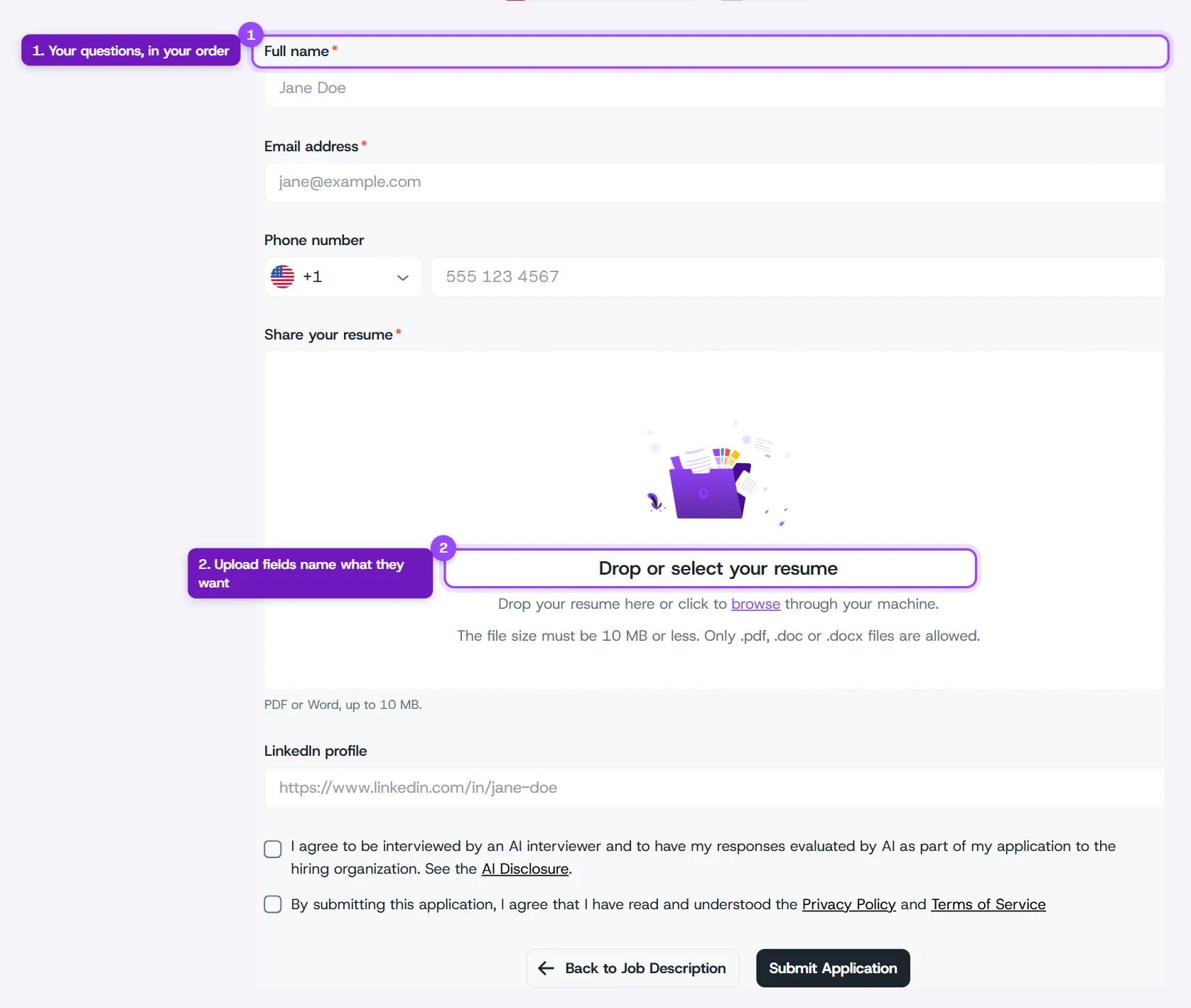
Questions marked with a red **\*** are required. Every form asks for your full name and email address. Many also ask for your phone number, resume, and LinkedIn profile, along with questions specific to the role.
Drag your resume into the upload box, or click **browse** to pick it. The box shows which file types and sizes it accepts. For most jobs that's PDF or Word (.pdf, .doc, .docx), up to 10 MB.
Tick the boxes agreeing to be interviewed and evaluated by AI, and to the Privacy Policy and Terms of Service. If the role includes interview calls or texts, there's also a box for that.
You'll see a confirmation once your application is sent.
 Answer screening questions honestly, such as years of experience or where you can work. They help the company match you to roles that genuinely fit.
## If Your Application Doesn't Go Through
| You see | What to do |
| - | - |
| **Your application is not ready to send** | A required box isn't ticked. Tick it, then click **Submit Application** again. |
| A message under a question | That answer is missing or in the wrong format. Fix it and submit again. |
| **We could not send your application** | Nothing was submitted. Click **Submit Application** again. If it keeps happening, see [Contacting Support](/troubleshooting/contacting-support). |
| **This role is not taking applications yet** | The company hasn't finished setting up the form. Check back shortly, or contact the hiring team directly. |
## What Happens Next
Depending on the role, you may be invited to an AI interview or a take-home assessment. Invitations arrive by email. See [What Is an AI Interview?](/candidates-guide/what-is-ai-interview) to get a feel for what's ahead.
## Related Guides
This documentation is built and hosted on [Mintlify](https://mintlify.com), a developer documentation platform.
Answer screening questions honestly, such as years of experience or where you can work. They help the company match you to roles that genuinely fit.
## If Your Application Doesn't Go Through
| You see | What to do |
| - | - |
| **Your application is not ready to send** | A required box isn't ticked. Tick it, then click **Submit Application** again. |
| A message under a question | That answer is missing or in the wrong format. Fix it and submit again. |
| **We could not send your application** | Nothing was submitted. Click **Submit Application** again. If it keeps happening, see [Contacting Support](/troubleshooting/contacting-support). |
| **This role is not taking applications yet** | The company hasn't finished setting up the form. Check back shortly, or contact the hiring team directly. |
## What Happens Next
Depending on the role, you may be invited to an AI interview or a take-home assessment. Invitations arrive by email. See [What Is an AI Interview?](/candidates-guide/what-is-ai-interview) to get a feel for what's ahead.
## Related Guides
This documentation is built and hosted on [Mintlify](https://mintlify.com), a developer documentation platform.